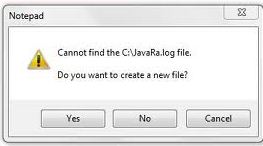
Error while opening Javara.log file on Windows Vista
Asked By
0 points
N/A
Posted on - 07/20/2011

From the moment I heard about the vulnerabilities and security holes in a few old JRE versions , I decided to remove them. I found that there are a lot of older JRE versions installed on my PC.
I downloaded JavaRa a simple freeware tool to remove old and redundant versions of the Java Runtime Environment (JRE). Successfully installed it on my Windows Vista Ultimate machine and it was working fine. It usually creates a log file C:JavaRa.log each time it is run which is displayed to the user.
But this time when I try to view the activity log file it comes up with an error message ” Cannot find the C:JavaRa.log file. Do you want to create a new file? “
Has anyone faced an error like this?