


Windows 7
I have some personal data which I want to store in a folder.
It should be protected in such a way that no one can easily open it without permission.
How can I make it more secure?
I tried different software to make folder protected through passwords. But none of the software was working.
In Windows 7, there is an option of making drive protected through password but that also requires too much space.
Is there any GOOD and more efficient way of making folders protected?

- 900 views
- 3 answers
- 2 votes
My graphics card is Intel Graphics Media Accelerator.
When I upgraded to Windows 7 Ultimate from Windows XP, my graphics card driver is not installed.
I only have a resolution of 640X480. Searching for updated driver produced no result.

- 1630 views
- 4 answers
- 1 votes
I have installed Windows 7 in my laptop but I am facing some issues in installing "TURBO C" (ERROR: compatibility issue).
I installed DOS and then tried to run "C". Now I can execute my codes but not as efficiently as it was executing them on Windows XP. Is there any other software available for designing and executing codes?
- 1465 views
- 2 answers
- 1 votes
I have installed the Symantec DLO agent on my Windows 7 PC recently. DLO Desktop Agent on Windows 7 comes up with a Windows Message Box with the following error message:
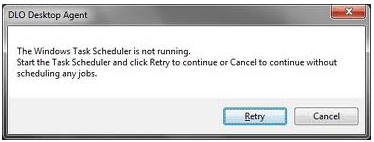
DLO Desktop Agent
The Windows Task Scheduler is not running.
Start the Task Scheduler and click retry to continue or Cancel to continue without
scheduling any jobs.

- 8324 views
- 2 answers
- 1 votes
I am an auditor and most of the day, I need to work with Excel sheets and Word documents. I need to do a lot of research which makes me end up opening at least 25 to 30 windows and more at the same time.
This is my regular work, I purchased a new notebook HP 3105m Notebook PC, with pre installed Windows 7, AMD Dual Core Processor, 320 GB hard drive, 2 GB memory and AMD Radeon HD(2) graphics.
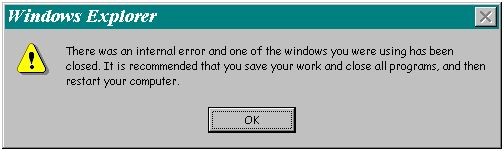
Windows Explorer

- 1320 views
- 2 answers
- 0 votes
I have installed WIN XP in tow computers and I had used internet connection sharing in them, so I setup the first computer use static IP address 192.168.0.1 with internet connection, and had the other computer obtained its IP address automatically.
File sharing works fine and everything was good, then I installed Windows 7 ultimate (32 bit) in tow computers, but both of them could not be connected to the internet. When I checked its connection details, the Auto configuration IPv4 Address was 169.245.223.63. I think this IP address should be something like 192.168.1.xxx; really I can’t do anything else, Please tell me what to do now ?
Thanks in advance,
Sandra

- 1418 views
- 2 answers
- 0 votes
I have a 4 GB pen drive. I am using it as a little drive for bearable software. When I copy my needed files from this pen drive, the files are not copied. There is a message shown as,"Read only file. Do not copy. Please tell the Microsoft etc."
Now how can I copy this file from my pen drive?

- 2826 views
- 2 answers
- 1 votes
I faced a new problem at that time. I cannot open my driver with a double click.
There is no message or no signal about this problem. Not only also single click.
How can I open my drive with a double click?

- 1099 views
- 2 answers
- 0 votes
I installed an old version of K-lite codec player in my PC. It is not played in my PC. So I tried to remove it from my system.
I opened the control panel and selected add or remove programs. Then I selected change/remove option from this box but a message is shown as, "some file is corrupted unable to remove etc."
So how can I remove this from my PC?

- 1111 views
- 2 answers
- 0 votes
My computer is running Windows 7 from Windows XP Home. Ever since I changed my operating system, I always made some mistakes on my computer settings, and most of the time it gets infected with viruses. When it happens, I always do a clean install. since I only have an installation disk of Windows 7 with me. I don’t have any premium Antivirus software installed on my PC. I know that reformatting my computer may cause serious problems so what I want to know now is, how can I make a restore point for the next time I have problems. I will just go back to my last restoration point and will not do a clean install again and again.
Please send me step by step procedure on Windows 7.
Thanks.

- 1284 views
- 4 answers
- 0 votes
Latest Articles

Top 7 Tech Features That Make Online Games Addictive (In A Good Way)

Tiny Systems That Make Apps Stick

Free cloud mining is coming! RICH Miner launches mobile mining, everyone can earn cryptocurrencies
Latest Blogs

Top 10 New Laptop Entrants That Shook The Public

10 Facts About The Dark Web

Top 10 Latest Steam Cleaner Machines
Latest Tips

Top 10 Internet Monitoring Software

Top 10 Best Partition Manager Software
