


Networking
Good day to all,
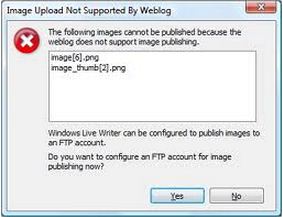
Image Upload Not Supported by Weblog

- 925 views
- 2 answers
- 0 votes
Hi, my problem here is about remote connection using Windows Live Mesh. I received an error when I started a session, the error message goes, "sorry there was a problem allowing remote connections, Please try again".
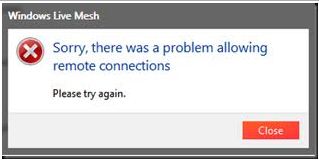
Windows Live Mesh
Sorry, there was a problem allowing remote connections
Please try again.

- 2381 views
- 3 answers
- 0 votes
Hi folks, please allow me to post here my problem in installing Live Mesh, an error message appeared on my screen and inform me with compatibility issue, see below the screen shot I pasted.
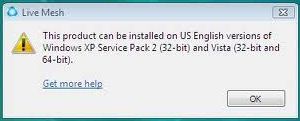
Live Mesh
This product can be installed on US English versions of
Windows XP Service Pace 2 (32-bit) and Vista (32-bit and 64-bit)
This problem started when I shifted to Windows 7 64bit. Earlier with Windows Vista 32bits there was no problem. I also saw somebody using Windows Live Mesh on a Windows 7 64bit, that is why I am thinking why, when I installed it on my Windows 7 64bits it won't work.

- 1663 views
- 2 answers
- 0 votes
Hi friends,
I have an issue here, this is all about my hard time in installing Live Mesh, while I am on the process of installing Live Mesh to my computer, I meet an error message, the error message goes like "Installer encountered errors. Error : 80004002".

Live Mesh
Installer encountered errors.
Error : 80004002

- 1737 views
- 3 answers
- 0 votes
Great Day To All, while I am at work, using Live Mesh it halted and gave me an error message, "could not synchronize folder in
Live Mesh, request to MOE failed with status codes: 400 Request can not be fulfilled".
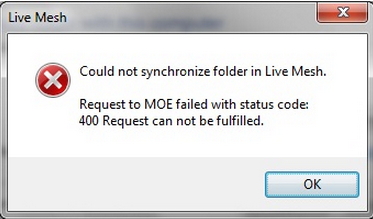
Live Mesh
- 1632 views
- 3 answers
- 0 votes
Every cricketer dreams of playing in big stadiums in front of thousands of spectators. Every venue has its specialties and hype associated with it. Some have world-class engineering used to build it while some are built on picturesque locations. Here are the Top 10 Most Beautiful International Stadiums in the World- 1. Lord’s Cricket Ground (London, England) It won’t be wrong to call this stadium the “Mecca of Cricket.” This stadium is owned by the Marylebone Cricket Club (MCC), the club which governs the Laws of Cricket. Situated in The John’s Wood in London, this ground has hosted many important matches including the finals of the first three World Cups. It is named after Thomas Lord, its founder, and has a capacity of holding 30,000 spectators. It can be easily identified by its iconic commentator’s box. 2. Optus Stadium (Perth, Australia) The Optus Stadium in Perth was officially opened in January 2018. It is a multi-purpose stadium, but it is often used for international cricket. Situated beside the Swan River in Burswood in Western Australia, it is the third-largest stadium in Australia. It can hold over 60,000 people and regularly hosts international matches and Big Bash League matches. 3. Bay […]

- 2517 views
- 2 answers
- 1 votes
Hi folks and friends,
I am posting here an image of an error message. I encountered this error message when I signed on to Windows Live Mesh.
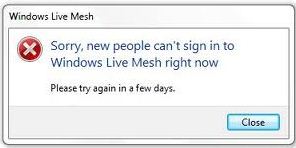
Windows Live Mesh
Sorry, new people can’t sign in to
Windows Live Mesh right now
Please try again in a few days.
When I read the instructions on the error message, it tells me to check my internet connection. As I am checking my internet connection, there is nothing wrong with my connection.
I also check on my firewall, there is no restriction on the connection for Windows Live Mesh.

- 2006 views
- 1 answers
- 0 votes
Hi Guys,
A while ago I received a mail in my inbox from a friend. It tells me that I am invited to Live Mesh. The Live Desktop user interface looks nice and cool, somewhat like a real desktop. I immediately get into the installer for my computer, because that would make Mesh do great, from an online storage service like SkyDrive.
But I was greatly surprised, to get an error message: 'Product does not support running under elevated administrator account or with UAC disabled'.
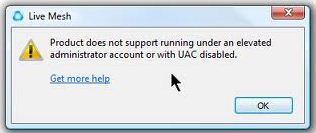
Live Mesh

- 979 views
- 1 answers
- 1 votes
I have a laptop that I'm bringing with me every time I go to school. And I also have a desktop in my home, my problem was I cannot access my desktop using my laptop although my telnet was enable all configuration for remote access was enabled. I try connecting through dynamic IP and the IP that my ISP provide. I don't know what IP Address i need to connect with my desktop computer.? Please help me. by the way the OS of my laptop was Vista and my desktop was XP

- 861 views
- 3 answers
- 0 votes
Hi,
Why do we need to use NULL MODEM, though we do have a DCE interface?
Sincerely,
Ahmad Raza

- 2089 views
- 2 answers
- 0 votes
Latest Articles

How T-Mobile Postpaid Plans Improve 5G Connectivity And Mobile Value For Everyday Users

Skill-Based Slots Trend Or The Future Of The Industry

Top 7 Tech Features That Make Online Games Addictive (In A Good Way)
Latest Blogs

Top 10 New Laptop Entrants That Shook The Public

10 Facts About The Dark Web

Top 10 Latest Steam Cleaner Machines
Latest Tips

Top 10 Internet Monitoring Software

Top 10 Best Partition Manager Software
