


MS Excel
I want to have 11 sheets in a workbook. The 1st sheet called "names", the 2nd called "Work 1", 3rd called "Work 2", And so on until the the 11th called "Work 10".
I need to set up a formula so that on sheet Work 1 cell A1 will = cell A1 from the names sheet (i.e. = Names!A1).

- 855 views
- 1 answers
- 0 votes
I have a problem. Whenever I open my Excel files in my office PC it keeps asking that "Do you want to save the file or not". Even if I don't change any of the content of the said file it always asks this question.
When I open it again, it will ask thousands of times to save or don't save. Even if I am using the newer version of MS Office, I
faced the same problem with the older version. Problem remains unchanged. Solve this please.

- 1873 views
- 3 answers
- 0 votes
Microsoft Excel 2007 has a system to print a fixed item of the row-column in every page on the header and footer automatically.
I need to know if there is any system in Microsoft Word 2007 which can help me print a fixed item on every page on the header and footer automatically.
I need a good suggestion.

- 1404 views
- 2 answers
- 0 votes

I have been doing most of the work in Microsoft Word & Excel 2007 and most of the file is very big so it is not possible to copy and paste, but sometimes I need to exchange files between Microsoft Word & Excel 2007.
It shall be helpful if any person give us a good advice.

- 1381 views
- 2 answers
- 0 votes
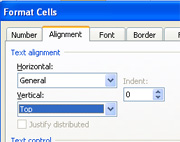
When I worked with the Microsoft Excel 2007 and input data in a cell, it was always set in bottom line.
It seems to me it is default setting, but I need the default setting as top line instead of bottom line.
Is it possible?
If possible please let me know the process.

- 867 views
- 1 answers
- 0 votes

I found an article in the web site about the Ribbon option of Microsoft Office 2007. The Ribbon is a new feature for Microsoft Office 2007. There are several ways to turn off the ribbon in order to save space on my computer.
I need to know how can I implement the Ribbon for my computer?

- 1209 views
- 1 answers
- 0 votes
A Caribbean Premier League cricket franchise, the Guyana Amazon Warriors are based in Providence, Georgetown, Guyana. The group competes in the Caribbean Premier League as Guyana’s national cricket team. It was one of the six groups assembled in 2013 for the competition’s first year. It was miserable that they had yet to win a single trophy. They qualified for the finals in 2020 and 2021. They finished second in both the inaugural season and the following season. And they were also completed second in 2016, 2018, and 2019. They were one of the CPL’s top teams. The next is a list of Guyana Amazon Warrior’s players by the number of runs. 1. SO Hetmyer (1430) Shimron Odilon Hetmyer is a left-hand top-order batter for West Indies. He played for Guyana Amazon Warriors from 2016 – 2022, with 57 innings in 58 matches, scoring 1430 runs facing 1098 balls, including one century and eight fifties, and has a 130.23 strike rate and a 28.03 batting average. His highest innings score is 100. 2. LMP Simmons (1029) LMP Simmons is a right-hand top-order batter for West Indies. He played for Guyana Amazon Warriors from 2013 – 2015, with 29 innings in 29 […]

- 2113 views
- 2 answers
- 0 votes
I have a problem regarding my MS Excel. An error message is appearing whenever I open my Document. The message is as follows:
" 'C:Program FilesExcel Image Assistant.xla' counld not be found.Check the spelling of the file name, and verify that the file location is correct.
If you are trying to open the file from list of most recently used files on the File menu,make sure that the file has not been renamed,moved, or deleted."
Can I have a useful solution to this?

- 969 views
- 3 answers
- 0 votes
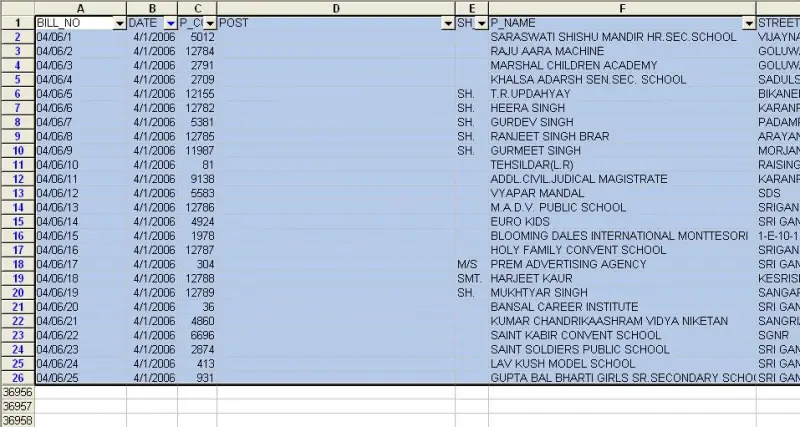
I am using Microsoft Excel 2003. When I use auto filter option, it filters the data.
But when I try to copy that filtered data to another sheet it does not work.
The whole list is copied to another sheet.

- 1833 views
- 3 answers
- 1 votes
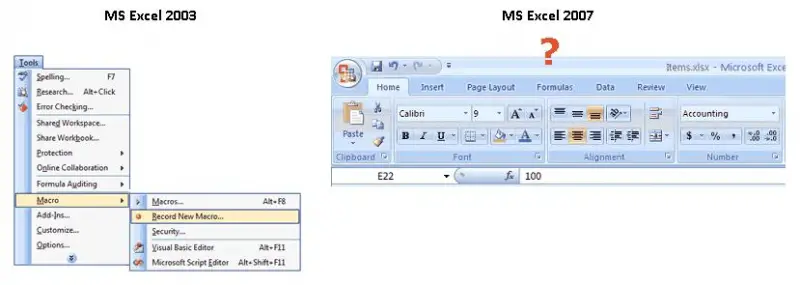
I am new to using Microsoft Excel 2007, having upgraded from version 2003. I often use macros to automate some functions, tasks, and algorithms in my spreadsheets.
I used to be able to do it easily with MS Excel 2003, but now that I've upgraded to version 2007, I can no longer find that functionality that allows me to record or edit a macro for my spreadsheets.
I've tried looking under the new menus, but I cannot find the Macro menu or sub-menu under any of the tabs.
How can I use the Macro functions in MS Excel 2007?

- 947 views
- 1 answers
- 0 votes
Latest Articles

How T-Mobile Postpaid Plans Improve 5G Connectivity And Mobile Value For Everyday Users

Skill-Based Slots Trend Or The Future Of The Industry

Top 7 Tech Features That Make Online Games Addictive (In A Good Way)
Latest Blogs

Top 10 New Laptop Entrants That Shook The Public

10 Facts About The Dark Web

Top 10 Latest Steam Cleaner Machines
Latest Tips

Top 10 Internet Monitoring Software

Top 10 Best Partition Manager Software
