No of visitors who read this post:
184
Category:
System Utilities
Type:
Question
Author:
Gabriel S Nalley
Recently I am bothered about the temperature of my CPU cores. Is there a way to know the temperature of my CPU cores ?

- Login or Signup Now to post comments

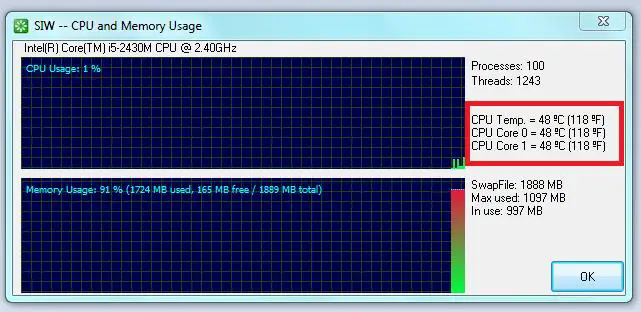
Yes there is a way to check the temperature of your CPU. You can use the SIW ( System Information Tool ). It actually gathers information about the system properties, hardware and settings of your computer or laptop. It also gives you detailed specifications for your CPU, Network, TC/IP, Hardware, Memory, Users and more. There are a lot more that you can see with this program and the good thing about it is that it is FREE.
To download this program just go to this link - http://www.snapfiles.com/get/siw.html. Click on the Download Now button on the right hand side. After downloading you will have to unzip the file then click on the exe file to install it.
Once you have installed it, Open the Program then on the upper part of it click on the icon that you see on the image below.
After clicking the button it will open a new window, and on this new window is where you will see the temperature of your CPU and Cores.
Hi!
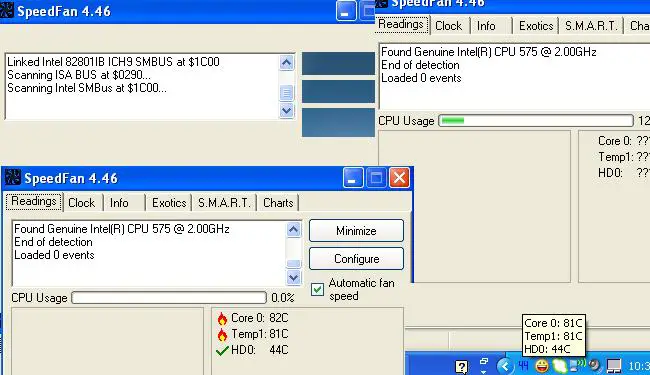
There is a solution in monitoring the temperature of the core and CPU, you can use speedfan, this program monitors the voltages, you can visit this link to check or if you want to install it http://www.almico.com/sfdownload.php. This is also the software that I use in monitoring my temperature. So easy to install this software, but if you want to monitor the temperature you have to run it manually, if this appear in the desktop you can minmize it and it will directly go to the taskbar. You can also able to configure the speed of the fan, there are so many option you use on how you want the fan run in your PC. This program work in Windows 9x, ME, NT, 2000, 2003, XP, Vista and Windows 7. It works with Windows 64 bit too.