Asked By
danseagul
0 points
N/A
Posted on - 08/04/2011

Great day to all,
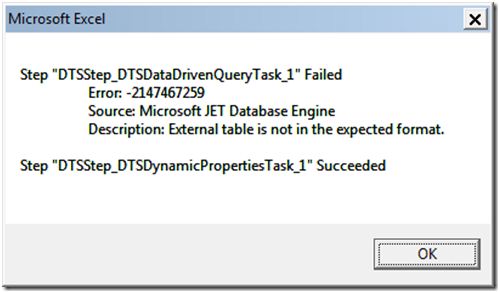
While I am working with my worksheet at office I received an error message generated by Microsoft Excel, I pasted below the whole content of the error message for better view of my problem.
Microsoft Excel
Step “DTSStep_DTSDataDrivenQueryTask_1” Failed
Error: 2147467259
Source: Microsoft JET Database Engine
Description: External table is not in the expected format.
Step “DTSStep_DTSDynamicPropertiesTask_1” Succeeded
Ok
As I read on the error message, it gives me a lot of head ache since I am not a technical person to understand the error, I also found nothing when I search on the internet for similar error, that is why I tried to post this issue here on techyv, hoping to get some ideas on my problem.
Thanks for reading my post.
Answered By
Taniya
0 points
N/A
#98086
External table is not in the expected format.
Danseagul,
The issue you are facing may be because of the Add-ins installed on the computer. You can try disabling and enabling the Add-ins one by one and check whether the issue is resolved. Please follow the steps:
-
Open Outlook.
-
Click the Office button and choose “Excel Options”.
-
Click “Add-ins” on the left panel.
-
Select “Excel Add-ins” from the drop-down menu next to “Manage” and click the “Go” button.
-
Uncheck all the marks next to the add ins and try enabling it one by one and check whether the issue is resolved.
Hope this will help you in resolving the issue.
Cheers,
Taniya
Answered By
mon47
0 points
N/A
#98087
External table is not in the expected format.
The data entry in Excel as hard and as easy that couldn't you understand firstly.It's a peculiar software it need practice month after month to grasp. However,Excel has great demand at data processing.
You should go to thoroughly to an Excel sheet, should understand Microsoft Excel File-to create a file. Edit to editing, view-for viewing, Format-for rightly Formatting .You should formatting properly in Excel nor we could capable to Formatting after receiving the Error. You must learn formatting yourself.
Format menu's sub menu Cells, Row, Column, Sheet, Auto format, Conditional Formatting, style.
If you want to format cells-It has sub-sub-menu: number, alignment, font, border, patterns, protection.
When you correctly format you will not see any error.