No of visitors who read this post:
762
Category:
System Utilities
Type:
Question
Author:
Pamela Opland
Hi,
I use Windows 7 and Internet Explorer. I got this error message when I tried to set up the VPN client software shown in the picture. I tried looking for the secure gateway that it was talking about in the error but I can’t find it anywhere. Please help me.
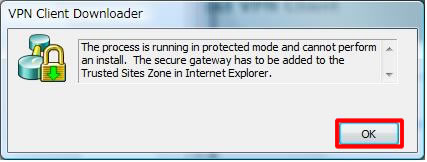
Error:
The process is running in protected mode and cannot perform an install.The secure gateway has to be added to the Trusted Sites Zone in Internet Explorer.

- Login or Signup Now to post comments

I think, you have gotta missed some point when you have been installing VPN downloader in your PC/OS (Operating system). Please follow the instruction here I discussed.
You can install the VPN Client on your PC/OS through any of two different applications.
1.InstallShield
2. Microsoft Windows Installer (MSI).
Both applications use installation wizards work as a installation aid of VPN. Installing the VPN Client through InstallShield includes an Uninstall icon in the program group. MSI does not need this.
Before you install VPN client downloader you have to collect this requirement-
Hostname or IP address of the secure gateway.
Your IPSec Group Name (for preshared keys).
Now follow the process-
Exit all Windows programs, and disable any antivirus software (through MS add/remove program process).
Insert the Cisco Systems CD-ROM in your system's CD-ROM drive.
Now select Start > Run. The Run dialog box then appears.
In this steps- Enter E:\VPN Client\CD-ROM\InstallShield\setup.exe, where E: is your system's CD-ROM drive.
At last click on OK.
If you do so, but still you have to facing the error, then probably you are trying to install the VPN Client software from a network drive. It is not allowed. So you can’t use a network drive.
For more info visit the site- http://www.cisco.com/en/US/docs/security/vpn_client/cisco_vpn_client/vpn...
Hope you can get resolved now.