


MultiMedia Applications
Does anybody have any idea of what is going on with my Adobe Premier 9? I was editing my video and was doing some finishing touches. When I was trying to preview it, I got an error message stating: Adobe Premiere Elements.exe No Disk.
There is no disk in the drive. Please insert a disk in to drive Device Harddisk3DR3. The message will only disappear when a disk is inserted although I am not writing my video into it. I need your suggestions on resolving this. Thanks a lot.

- 2008 views
- 1 answers
- 0 votes
Good Morning,
I am developing legal briefs, which contain multimedia presentations, form elements and searchable documents and it is saving on a CD. These CD’s are meant to be used by the Court. I am not a programmer or a trained designer, but just an attorney.
I have bought ‘Acrobat 7 Pro’ along with the books ‘Acrobat forms with java script’ and ‘Adobe Acrobat 7 PDF bible’. I have bought ‘DocuMate 262’ scanner and I got ‘Omnipage Pro 12’ along with it for OCR capabilities.

- 1639 views
- 1 answers
- 0 votes
Techies,
I am not able to play all video and audio files in the KM player. I have chosen ‘XINE’ engine for KM player. When I am trying to play new file, there is a message showing in the bottom of KM Player which says ‘Ready’, but nothing is happening in the window.
I have changed the engine for KM player to ‘Media Player’. After this I am getting the message that ‘media player is buffering’ in the main window when I am playing a new file. The same is happening with KAFFEINE when selecting the XINE engine and playing new file I am getting the message that ‘XINE INITD’ and it got hanged.
What is the common issue here ? Can you help me fix it ?
Billie

- 910 views
- 1 answers
- 0 votes
Hi friends,
I am creating lot of frame sequences for an animated character, by using Anime Studio and it will be used somewhere. So I am having lot of actions. I want to perform such actions from command line but presently I am able to do if from the main line.
Can I specify the actions through command line? Please let me know if I can add a key frame for all bones of specified bone layer, at the same time on a specified frame. Because I have to put ‘stop’ frame between the sequences on the mainline to block them from influencing the action of the following.
Kindly help me get out of this problem.
Jacob

- 978 views
- 1 answers
- 0 votes
Hi there,
The Adobe Flash Player 10 is not able to download in my Vista PC. I want to use the Adobe Flash Player 10 with Mozilla Firefox 3. I have clicked on the link provided at ‘get.adobe.com’ to download the same, as per instructions. I think it was supposed to ask for ‘run’ or ‘save’, but it was asking for ‘save’ or ‘cancel’ only. So, I selected ‘save’ and then another dialog box opened up ‘install_flash_player.exe’ and it gave me an message which says that ‘it is an exe file and it may contain viruses’ and then I selected ‘OK’ and ‘continue’.

- 890 views
- 2 answers
- 0 votes
I have a Windows Media Encoder on a computer with 2GB RAM and i3 processor with Windows XP SP3. While trying to encode a video, it will be shown at first, but when encoding the audio to keep, the video is missing. How can I fix it?

- 1070 views
- 3 answers
- 0 votes
Hi Everyone,
I have an old Applian FLV player which is been completely uninstalled during a downgrade of Vista to Windows XP.
I tried to use Moyea FLV player in XP that suddenly can start because an entry point not found.
Where could I download this entry point to run this Moyea application?
I tried reinstalling the Moyea player but it doesn’t solve.
Any help please,
Thanks!

Moyea FLV Player.exe – Entry Point Not Found
The procedure entry point_except_handler4_common could not be located in the dynamic link library msvcrt.dll.

- 1409 views
- 1 answers
- 0 votes
Hi All,
I tried to update new version of iTunes which is version 9. After the said update and run the application iTunes error displays. I don’t know why it need an Apple Application Support were old version does not.
Is anyone there has a solution of this error? Can you please help me out, Thanks in advance!

iTunes
Apple Application Support was not found.
Apple Application Support is required to run iTunes. Please uninstall iTunes, then install iTunes again.
Error 2
OK

- 6647 views
- 6 answers
- 0 votes
Hello,
New version of QuickTime could not be installed because it seems that the older version could not be uninstalled.
I have tried the Add/ Remove in Control Panel but same error message appears again.

Uninstall
The following file does not exist or is not a valid uninstallation log file.
C:WINDOWSsystem32QuickTimeUninstall.log
OK
Please help.
Thanks.

- 1356 views
- 3 answers
- 0 votes
Hi All,
A fatal error appears in screen when playing movie in MPlayer. I’m not sure if I forgot something to be added in mplayer. I installed mplayer in Ubuntu 7.04 64 bits. I can play the mplayer in my other unit using Fedora. Is there something wrong with my video in Ubuntu? Any ideas? Thanks in advance.
Fatal error:
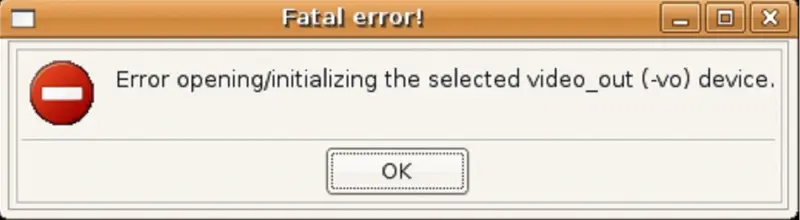
Fatal error!
Error opening/initializing the selected video_out (-vo) device.
OK

- 1156 views
- 1 answers
- 0 votes
Latest Articles

Top 7 Tech Features That Make Online Games Addictive (In A Good Way)

Tiny Systems That Make Apps Stick

Free cloud mining is coming! RICH Miner launches mobile mining, everyone can earn cryptocurrencies
Latest Blogs

Top 10 New Laptop Entrants That Shook The Public

10 Facts About The Dark Web

Top 10 Latest Steam Cleaner Machines
Latest Tips

Top 10 Internet Monitoring Software

Top 10 Best Partition Manager Software
