


MS Access
I have ongoing project in MS Access that I need to put relationship between 3 tables. How can I put relationship in these 3 tables?

- 854 views
- 1 answers
- 0 votes
I want to add a background picture in a form.
How to add a back ground picture while creating a form in MS-Access?

- 845 views
- 1 answers
- 0 votes
Hi everyone,
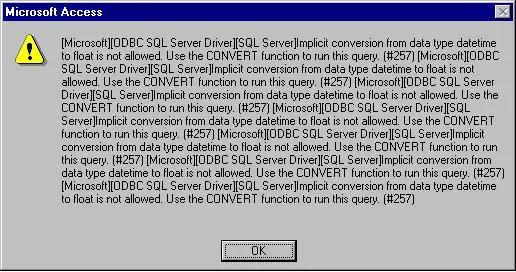
Does anybody have an idea of what is this error that I have encountered in Windows while running any Windows applications?
I don't know why this error keeps on appearing. I would greatly appreciate any help regarding this matter.

- 941 views
- 1 answers
- 0 votes
Can I install MS Office on my computer even if there is already one installed? It is only because I need it opens a database that is created in 2003 version and I don’t want to overwrite the existing Office 2010. Can anyone please tell me what to do?

- 941 views
- 1 answers
- 0 votes
When using the built-in wizards in Microsoft Office Access 2010 (64-bit) after applying Service Pack 1 (SP1), I am receiving the error:
"The database cannot be opened because the VBA project contained in it cannot be read. The database can be opened only if the VBA project is first deleted. Deleting the VBA project removes all code from modules, forms and reports. You should back up your database before attempting to open the database and delete the VBA project."
Once I click OK on this message, I receive another one:
Cannot update. Database or object is read-only.
How to solve the error?

- 2046 views
- 1 answers
- 0 votes
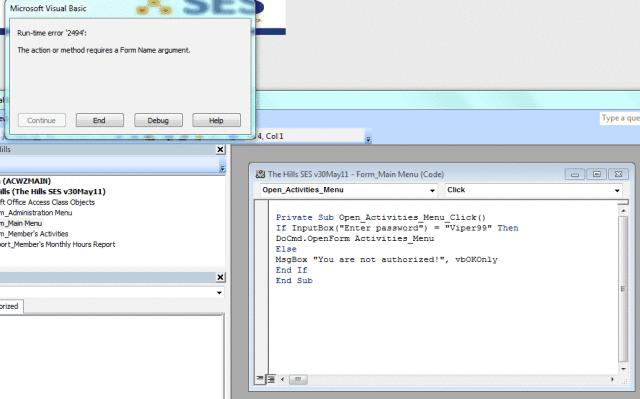
I want to use a button for password protecting method. Tried out the following code. But it isn't working properly.
Could you please specify the bugs and could you please handle these?
Thank you million times.

- 1048 views
- 2 answers
- 0 votes
I tried to boot Microsoft Office onto my Mac 2011 only to receive a problem report. It said that this product needs an Intel-based Macintosh pc. Can you tell me what this means and what I need to do to fix it?

- 909 views
- 1 answers
- 0 votes
Hi, everyone! I need your assistance in disabling the macro or security of Access 2010 for all accounts. I also need it to be disabled for both the runtime version and the full version.
We only use Access with our in-house program that I have developed. We do not use Access for reasons other than that.
I do have other in-house programs that use Access 2003 MDB or MDE that have been working for several years without any issues. Now that we have ten additional computers that have Access 2010 installed on it, we get error messages coming from the application.

- 2081 views
- 1 answers
- 0 votes
How do we import MS Visual Foxpro .dbf tables into MS Access 2007?

- 1908 views
- 1 answers
- 0 votes
Hi,
I am using Microsoft access 2010. Can you teach me how to filter data on MS access 2010?
Waiting for your help. Thanks.

- 942 views
- 1 answers
- 0 votes
Latest Articles

How T-Mobile Postpaid Plans Improve 5G Connectivity And Mobile Value For Everyday Users

Skill-Based Slots Trend Or The Future Of The Industry

Top 7 Tech Features That Make Online Games Addictive (In A Good Way)
Latest Blogs

Top 10 New Laptop Entrants That Shook The Public

10 Facts About The Dark Web

Top 10 Latest Steam Cleaner Machines
Latest Tips

Top 10 Internet Monitoring Software

Top 10 Best Partition Manager Software
