Asked By
lukegams
1020 points
N/A
Posted on - 07/13/2011

Hi,
I am at our office doing some business proposals using ms word, when I am done writing the proposals, I want it to be save into a PDF file, so I used Bullzip to print it to a PDF file, when I am on the process of printing my proposal to PDF file,
I meet an error, it is generated by Bullzip, the error message goes Unable to locate Ghostscript installation, see below the error message.
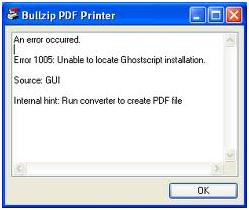
Bullzip PDF Printer
An error occurred.
Error 1005: Unable to locate Ghostscript installation
Source: GUI
Internal hint: Run converter to create PDF file
When I read the error, I am not familiar with it, this is my first time to encounter such error, my office mate cannot help me with this error,
Please help me understand this error, and how to fix this error,
Thanks.
Answered By
Scot1984
15 points
N/A
#122810
Unable to locate Ghostscript installation
Go through the below information to get install the Ghostscript…
Go to the homepage of Ghostscript. Select either the APFL or GPL version of Ghostscript.
Check the word "Obtaining the latest version of Ghostscript" or "download Ghostscript" As a general advice, always go for the latest version! At the time of writing the latest current version is 8.50
Locate the Ghostscript package for Windows
Download the Windows installer
Install Ghostscript on your machine
Make Ghostscript available to II2LN
Specify the Ghostscript bin-folder in your PATH environment variable
Copy the content of the bin-folder to a directory already in the PATH statement
Use the SetGhostscriptProcessor import option
Unable to locate Ghostscript installation
The easiest way to resolve this issue is to download the Ghostscript Lite.
Install it from your computer and then reinstall Bullzip PDF Printer.
Unable to locate Ghostscript installation
Hello Luke,
The following is the procedure that will help you install Ghostscript on your computer properly:
-
First you will need to download Bullzip PDF Printer here or from the following hompage.
-
After that you will need to extract the file and then Click on Bullzip program to Install.
-
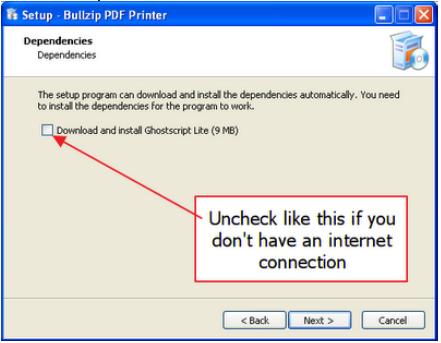
In case you have an Internet connection, you will need to click Next > Install > Finish.
-
In the event that you do not have an Internet connection, do as follows:
-
After that you will download GhostScript Lite from Bullzip website here. And then you will extract GhostScript Lite and after that Install it.
-
You can now can use Bullzip to print PDF file from many program such as Firefox, Word, Autocad, and others.
Regards,
Carl