

No of visitors who read this post: 1270
Category: Windows 7
Type: Question
Author: ScottBrown
No votes yet

Good Day to all

I am sharing one of my questions to all of you here, and I am looking out that someone will help me with the error message that I receive with Cellular Emulator.

I get an error message while trying to start Cellular Emulator. I have it installed on Windows 7 OS. I thought there could be a possibility of some files missing so uninstalled it and reinstalled it back again.

Can anyone point me to a solution?
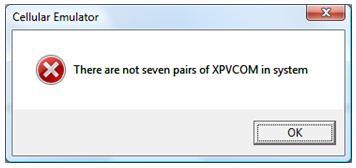
Cellular Emulator

There are not seven pairs of XPVCOM in system.

Comment viewing options

Select your preferred way to display the comments and click "Save settings" to activate your changes.

#

.

Hi,

Scott .   To resolve your problem, you have to work step by step on the options provided below:

Option 1-

Do you have any bluetooth virtual com ports installed on your Pc, If yes, remove them first and than Re-Start the machine, and start the emulator, you may be able to set up the Blue tooth ports again.

.

Option 2-

Open the Command prompt as administrator:

(Go to Start > Search> write command     you will see an icon of Command Propmt, right click and click run as administrator.)

To remove and than Re-Install the XPVCom   write the following command in the command prompt:

You must be on the directory where the program is installed, Normally it is:

CD \Program Files\Windows Mobile 6 SDK\Tools\Cellular Emulator\

.

write       InstallXPVCom.exe UnInstall  

               InstallXPVCom.exe Install  

The program should work now.

If you still have issues then go to the option 3

.

Option3-

You have to remove all the comm ports using programmes and devices *(hardware) such as Blue tooth.

Remove all the SDKs on your computer

Then Re-Start the computer, while Re-Starting do not allow the computer to detect any new hardware.

After the computer is restarted, then install the " Windows Mobile 6 Professional SDK Refresh".

Please be CAREFUL and do not install" Windows Mobile 6 Professional SDK "

.

You can then Re-Start and Install all the remaining hardware which are Dedtected at the time of Re-Starting.

.

Viqar








