No of visitors who read this post:
274
Category:
Web/Cloud Computing
Type:
Question
Author:
Garrick Sanderford
Hi there experts,
Today in the class, my teacher was talking about the latest Cloud System Booster and I could not understand anything about what he said. Can anyone explain me what is this Cloud System Booster thing? What is its purpose? How does it work? How will it be useful to its users. Suggest me whether I can use it for any purposes.
Thanks for the help in advance.

- Login or Signup Now to post comments

Hello Garrick,
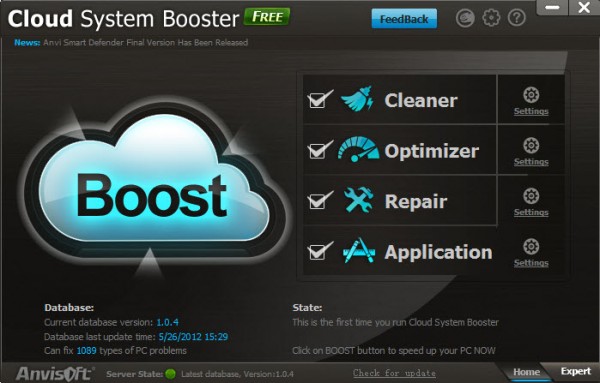
The Cloud System Booster is an optimization and maintenance tool for your PC based on cloud technology. This software can scan and analyze the entire PC within one second and can clean computer by several aspects like registry, unnecessary windows files and junk data on disk.
It can also optimize PC speed and software by analyzing various programs. It will work as a repairing tool too. These are mainly the functions and purpose of cloud system booster. If your PC is acting as a slow machine to you, and you are not able to find the problem, then I would recommend you to use this software.
Thanks
Cloud System Booster is a free program than can optimize, clean and repair your Windows Operating System. It is like the program CCleaner but the good thing about this Cloud System Booster is that it has added Optimization and Repair Tools.
After the installation of this program, you will be prompted with an option to set it with One-click access features from the start screen. It is recommended though to first check the settings so that you can see directly what a specific feature does.
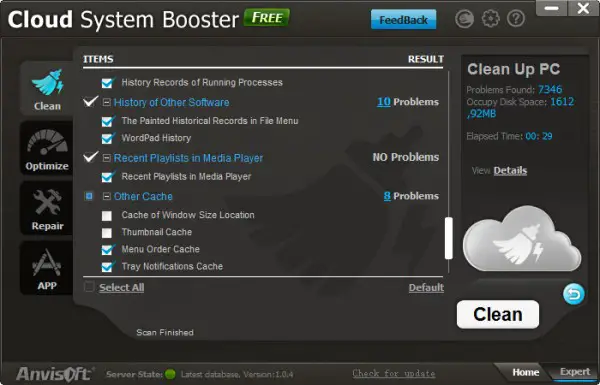
The screenshot below shows the Clean feature of Cloud System Booster. This feature is used to clean your web browser, window files and other software related files that are not really needed by your computer in order to function. Additional browsers that are supported by Cloud System Booster are Maxthon, Avant or Sea Monkey.
The screenshot below shows the Optimize feature. From this window you can select which services you would like to disable on your computer.
Just below the Optimization tab you will see the Repair tab. This feature will allow you to resolve common file extension and registry errors on your computer.
Lastly, the App tab. This will allow you to clean specific apps on your computer which is basically the same as what you can do with the Clean feature, only difference is that this cleans a certain app on the computer which you can select from the list that will be provided by the program.
Anvisoft.com is a quite new company. But it provides powerful software. You can just have a try with the optimization software, cloud system booster.
Cloud System Booster is a new system maintenance & optimization tool based on cloud technology. It’s a strong all-in-one PC repair and system maintenance program with FOUR powerful functions: