Asked By
Art Gordon
0 points
N/A
Posted on - 10/21/2011

I recently bought this new printer and I was in the process of trying to install its software on my system using the media that came with it.
However the installation didn’t complete and I got this error:.
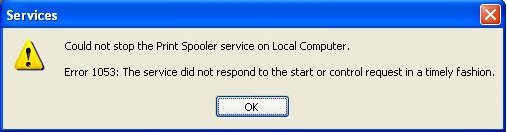
Services
Could not stop the Print Spooler service on Local Computer.
Error 1053: The service did not respond to the start or control request in a timely fashion.
OK
Thank you for your help.
How do i fix print spooler error 1053?
According to some research i did, this is a typical windows 7 problem (assuming you have windows 7???) that has to do with an important update that causes the print spooler to actually not be the print spooler anymore – that is why it will not start.
To determine if this is the case do the following:
Check in this -> C:WindowsSystem32 for the existence of spoolsv.exe.org and spoolsv.exe
Compare the file size of spoolsv.exe
At times the original spoolsv.exe will be called spoolsv.exe.org 545kb in size and in the place of spoolsv.exe place will actually be a 41kb file posing as the print spooler.the system backed up the original spooler at some point and replaced it accidentally with something else."spoolsv.exe" should be the 545kb file at this point.
To fix this please do the following
Step 1-> Rename spoolsv.exe to spoolsv.bak
Step 2-> Rename spoolsv.exe.org to spoolsv.exe
Rename spoolsv.exe.org by changing the file ownership from TrustedInstaller to the Administrator Group and giving the group write permissions for the file.
By changing the Ownership of the file from TrustedInstaller to Administrator then enabling Full Modify for the Administrator Group you can swap the files over by renaming and correct this issue.
Rename spoolsv.exe to spoolsv.bak and then rename spoolsv.exe.org to become the actual spoolsv.exe.
Start the print spooler via Services or at the command prompt typing -> net start spooler and hit enter.
And boom! all should work just fine – again (assuming that you have win 7 installed? ) let me know.
How do i fix print spooler error 1053?
you should install an authorized printer driver for that particular printer
Answered By
Gill7
0 points
N/A
#95082
How do i fix print spooler error 1053?
Windows 7 click start , click control panel ,click on Administrative tools ,double click on Component Services. On your left under Console Root click on Services. Now look for and right click on Printer Spooler and click on Properties ,click on Log On tab ,uncheck Allow service to interact with desktop ,click Apply and then Ok. Now start Printer Spooler You are done 🙂