

Hi.
I used my iPhone 4 for my social networking accounts especially in Twitter which I used in sending tweets. It was working well before but I can’t post any new message now. I always received an error to save my message as draft. The message cannot be posted. Please see the enclosed screenshot for the error I am receiving.
Help me also.
Thank you.
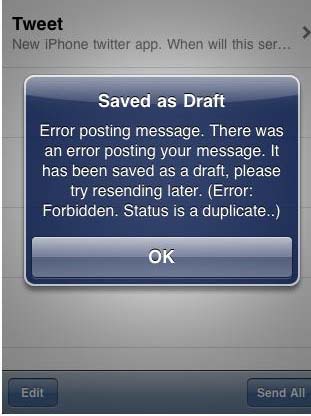
Saved as Draft
Error posting message. There was an error posting your message. It has been saved as a draft, please try resending later. (Error: Forbidden. Status is a duplicate..)

- Login or Signup Now to post comments

Dear Max fields
According to the error message u receive on your iPhones " Saved as Draft Error posting message. There was an error posting your message. It has been saved as a draft, please try resending later. (Error: Forbidden. Status is a duplicate..)".
This means that twitter rejected your posts as having duplicate content which is not allowed to be posted again by twitter. Try to go to twitter and under settings click the application and retype your password.
If u still have the same problem try to get an update to the twitter app and apply it, u might be able then to tweet your status without the duplicate content issue.
Hope this may help you.
Best of luck.
Hi Max,
This happened to me most of the time. I'll put the step by step process below to help you resolve this issue:
Let me know if any of this troubleshooting step helps.
Cheers,
Estela
If this is the first time it happened on your application, try rebooting your phone then try it again. Maybe refreshing its memory will make the application work again. But if it doesn’t, check the settings of your iPhone twitter application if it is allowed to send duplicate messages or identical tweets. I think you are sending some of your tweets that are duplicate or identical to your previous sent tweets just like what is stated in the error message that appeared on your phone’s screen. There is a part there that says something about a duplicate in the status.
If you still have the installer of your iPhone twitter application, try reinstalling the application on your phone. Uninstall first the application from your phone. Then after that, run again its installer to install it on your iPhone. See if this fixes the problem.
Regards
Sharath Reddy
I also use twitter on iPad and since the software of both the devices are same, i will probably help you to solve the issue. There are few reasons as to why it occurs so you have to take care of it first.
Hi Max,
The Forbidden error code in twitter means the request is understood, but it has been refused. This error code displays when the requests are being denied due to update limits. To fix the problem:
Go to Settings > Go to Twitter and checked your accounts.
Check if the username and password is there then re-enter your username and password. This allows the system to display the lots of ticks.
I hope that your iPhone will work properly now.
Hello Max,
To make everything work properly again you have to do the following things
1. Go into the phone settings for twitter and retype your password again. Then you will be able to post a tweet.
2. If you have problems, with tweets including pictures then go into twitter settings, into advanced, and change the image service from twitter to twitpic. Then you can post it again.
I think these two steps would do the trick. Have a good day.
Hi ,Good day Max first its better to check with the configuration settings you are trying to connect the network for your iPhone4 and later on if found error only in twitter as you said try to follow the steps as follows.
Hi, Max!
This just means that you have already posted that comment that you are trying to tweet. Hence the "Status is a duplicate". Try sending a new tweet and check if you are still receiving the same prompt. And try restarting Twitter as well, there might have been a slight lag in posting the message.
Hi Max Fields,
I have seen some possible answers in this site:
Getsatisfaction: Twitterfeed: 403 error: Forbidden - status parameter??
You may also check the answer in this site for reference:
Stackoverflow: how can I handle “error” in communication to twitter.com?=ruby + twitter gem
Hope that would help you solve your problem.
Thanks and more powers.
Hi,
You must update your Twitter application to be effectively capable to tweet images with no error message. Foremost, download the most recent update to your iphone application store. After downloading, install the application, sign out from twitter and after that sign in once more. It will work once you do this.
Best regards,
Heather marie








