

I’m using Windows 7 64 bit and was wondering for the possibility of elevated command prompt shortcut download. Also tell me if there is a manual way?

- Login or Signup Now to post comments
I’m using Windows 7 64 bit and was wondering for the possibility of elevated command prompt shortcut download. Also tell me if there is a manual way?
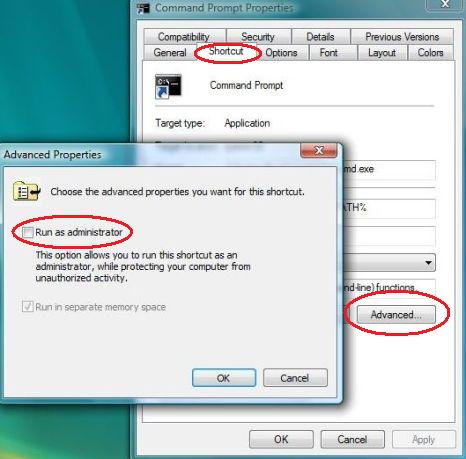
Hi,
To Download a "Elevated Command Prompt" Shortcut:
1. Download the file from the website below
http://www.sevenforums.com/attachments/tutorials/4424d1234176792-elevated-command-prompt-shortcut-elevated_command_prompt.zip
2. Save it to your computer.
3. Open the downloaded zip file and Extract (drag and drop) the Elevated Command Prompt shortcut to the desktop.
4. In the General tab, click on the Unblock button and then OK.
5. You can now pin it to the taskbar or start menu or wherever you want.
To create it manually:
1. Right click on your desktop and select new shortcut.
2. Type the location C:\Windows\System32\cmd.exe and name it Elevated Command Prompt and click on Finish.
3. Right click on the new shortcut from desktop and click properties. In the shortcut tab click advanced button and select Run as administrator and then click OK.









