Data Transfer issue through PC Mover application

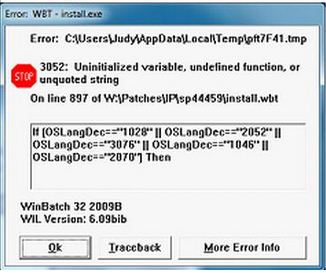
An error message (the attached one) appears on the new computer bought by my parents. I used PCM over application to transfer all their files and application from the old one to the new HP brand PC. As the HP Support Assistant automatically tried to update itself, the error popped up.
Even if I click ‘ok’ to avoid the issue, the message appears right in the center of the monitor every now and then. I have uninstalled HP Support Assistant going to Control Panel’s ‘Software Utility’ option and rebooted my PC. But this won’t get rid of the error, and it keeps annoying me until now.
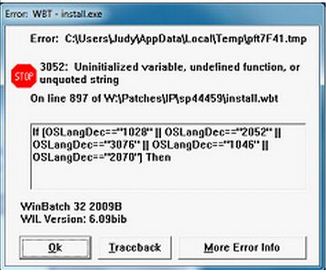
Error WBT – install.exe
Error: C:usersJudyAppDataLocalTemppft7F41.tmp
3052: Uninitialized variable, undefined function, or unquoted string
On line 897 of W:PatchesIPsp44459install.wbt
If{(OSLang=="1028" || OSLangDec=="2052" || OSLangDec=="3076" || OSLangDec=="1046" || OSLangDec=="2070") Then
WinBatch 32 2003B
WIL Version: 6.09bib
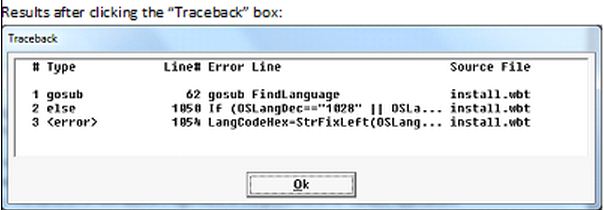
Type LInel Error Line Source File
1 gosub 62 gosub FindLanguage install.wbt
2 else 1050 If(OSLangDec==1028 || OSIa… install.wbt
3 <error> 1054 LanqCodeHex-StrFixleft(OSlang… install.wbt
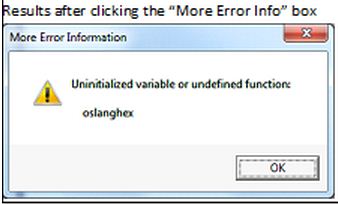
More Error Information
Uninitialized variable or undefined function
Oslanghex
Then, I made an effort to re-install the HP Support Assistant from scratch rebooting the system. The process came to a halt with an identical error message that appeared previously during the automatic update process.
Seeing that HP Update Application v5.001.000.014 was a precondition, I uninstalled the application with a view to re-installing it.
Once again, the installation process was interrupted by same kind of error. You can check the following screenshot for details. I would appreciate you help as our new brand PC isn’t hundred percent at the moment.
Error WBT – install.exe
Error: C:usersJudyAppDataLocalTemppft7F41.tmp
3052: Uninitialized variable, undefined function, or unquoted string
On line 897 of W:PatchesIPsp44459install.wbt
If{(OSLang=="1028" || OSLangDec=="2052" || OSLangDec=="3076" || OSLangDec=="1046" || OSLangDec=="2070") Then
WinBatch 32 2003B
WIL Version: 6.09bib