I was at home last night, when my friend chat me about an error the he encountered while using WinAVI Video Converter, he sent me a screen shot of the error, I posted below the screen shot of the error.
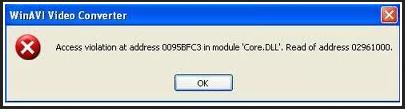
WinAVI Video Converter
Access violation at address 0095BFC3 in module’Core.DLL’.
Read of address 02961000.
When we both analyzed the error, we thought it was just a glitz in running the application, so I advised him to restart the computer, and load the software again, after he did so, the same error message appeared while working with WinAVI Video Converter, re installing the software is already done,
Please help us solved the issue so he can finish with his work.
Access violation error while using WinAVI
Dear Thomas
For overcome this problem, check these things:
Make sure that windows media player will play the source file which you want to convert. Check if your computer has been infected by a virus through updated antivirus software. Make sure that there is enough disk space available for said conversion.
Make sure that you are using latest version of Win AVI Video Convertor.
And you will download a K-lite codec package
Hope your problem will be resolve
take care
Stephy
Access violation error while using WinAVI
That error could be a problem with the DLL file. Try to uninstall and reinstall the program. Download the free version of Revo Uninstaller and install it. Once installed, start Revo then select WinAVI among the applications and click “Uninstall”. Follow the normal uninstall process. When uninstall is complete, click “Scan” to scan the computer for any leftover files and delete everything it finds.
This removes everything the program created on your computer. When it is finished, exit Revo then install WinAVI back. If you haven’t updated yet to the latest version, download the latest WinAVI Video Converter. The latest version at the moment, WinAVI Video Converter 11.5, supports Windows XP, Windows Vista, Windows 7, Windows 8.x, and Windows 10.