Firefox.exe Application Error Not Opening

Hi there everybody,
Firefox on my computer needs to be installed, but I am not able to install it, I mean I know how install it but its exe file is not running properly.
I had refreshed my computer window yesterday, and today I was installing the necessary software’s on it, so when I run the Firefox setup file it gave me the error message as in the image after performing a few steps of installation.
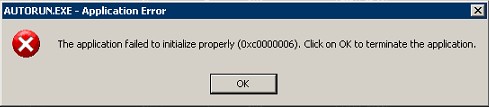
The application failed to initialize properly (0xc0000006). Click on OK to terminate the application.
I have a debugger program that debugs exe files so I debugged the Firefox setup exe file with that software and then again run it on my computer, but it was giving the same error again.
If you know how to debug the exe file then please tell me or tell a way to get this error resolved.