


Windows XP
hi
I have formatted my Windows XP computer hard-disc and would like to re-install Windows XP on my computer. But, all I have is a Windows XP upgrade CD with SP1. Is it possible to install Windows XP using the upgrade CD? If so, how can this be done?

- 764 views
- 1 answers
- 0 votes
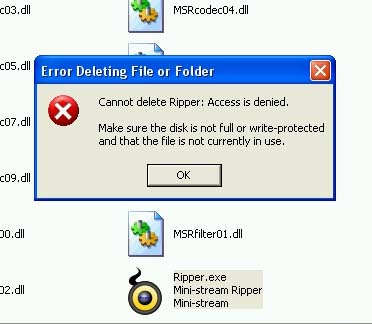
I have Mini-Stream Ripper installed on my Windows XP Pro computer. I am running out of space so I want to remove those applications that I don’t usually use. I’ve been trying to delete this one, but I was unable to.
I am using the uninstaller that comes with the software package. The icon was removed from my desktop, but the entire folders that are connected with Mini-Stream Ripper are still appearing on the Program Files folder. I keep getting
Access is denied error when attempting to delete this.
Please help me.

- 1016 views
- 1 answers
- 0 votes
i have a template and i want to print the template in windows 7 in xps format and also in windows xp but win xp does not support to print xps files ,
thanks in advance

- 1194 views
- 2 answers
- 0 votes
Any suggestions so that this PCI works well to my computer? I am running Windows XP. And I’m having an IRQ conflicts with the USB adapter. I want to change the D-Link WDA-23320 wireless PCI adapter because It having a conflicts. I already tried to install it and it went fine and after for a while it already stops working.

- 914 views
- 1 answers
- 0 votes
My computer seems to have crashed, and I don’t know why.
This the status of my computer right now:
- There are no icons appearing on my desktop.
- When I look at “All Programs”, only Adobe is visible.
- Task manager cannot be opened.
- On right clicking the desktop, nothing happens.
- Under “Program Manager” I can see some programs listed but cannot open them.
- Internet explorer icon is not available

- 630 views
- 2 answers
- 0 votes
Hello,
When I issue legitimate commands on MS-DOS such as "ping" and "ipconfig", the error below always pop up:
"[command] is not recognized as an internal or external command, operable program, or batch file."
You can refer to the attached image. However, when I change the directory to "C:WINDOWSsystem32", the commands will work. Setting the directory to anything else will fail.
I'm using Windows XP Professional, Service Pack 3. Also, I have another computer using the same OS, yet I can type in commands anywhere without getting the error. What could be wrong?

- 1540 views
- 1 answers
- 1 votes
How do you expand the partition size in Windows XP?
What if you delete the backup partition, and then you want to use the free space to add to the main partition, is it possible?

- 1322 views
- 2 answers
- 0 votes
I own an external hard disk and I want to check it for errors. Thus, I performed error checking from Properties>Tools. I ticked the two options: “Automatically fix file system errors” and “Scan for and attempt recovery of bad sectors”. For a while, I believed it stopped scanning so I decided to click the Cancel button and then the disk is unserviceable.
It displayed a message: “X: is not accessible. Access is denied." I encountered that message again after I attempted to check for errors. Kindly help me with my problem.

- 1110 views
- 3 answers
- 0 votes
Hi Experts,
Please help me on my problem, i am using Windows XP Pro computer. I am facing a problem with that sometimes I am getting an error message. The error message is like that ‘Fatal System error. The Windows Login stopped working.’ Then it is to be restarted by pressing the reset button. Please help me to fix this issue.
Thanks in advance.

- 798 views
- 2 answers
- 0 votes
My computer has been attacked by malicious threats plus some issues which I frequently encountered; I was unlucky to save my hard disk. So I need to replace it with a new one.
With the new hard disk, while I’m trying to install Windows XP in it, I keep getting errors and issues. So I wonder if there are some mistakes in setting up Windows XP. Can someone here send me a procedure on how to do it properly? Thank you.

- 1184 views
- 4 answers
- 0 votes
Latest Articles

Top 7 Tech Features That Make Online Games Addictive (In A Good Way)

Tiny Systems That Make Apps Stick

Free cloud mining is coming! RICH Miner launches mobile mining, everyone can earn cryptocurrencies
Latest Blogs

Top 10 New Laptop Entrants That Shook The Public

10 Facts About The Dark Web

Top 10 Latest Steam Cleaner Machines
Latest Tips

Top 10 Internet Monitoring Software

Top 10 Best Partition Manager Software
