


Windows XP
Various batsmen have made scintillating debuts in test cricket. We have had a lot of batsmen even in this century, notching up big scores in their test debut. We will now look at the highest scores in test debut from 2001. 10. Shaun Marsh (2011) Australia toured Sri Lanka for a three-match series. In the second match, the Australian batsman Shaun Marsh made his debut. Sri Lanka batted first and scored 174. Australia was at 116-3, when Michael Hussey joined hands with Shaun Marsh. Both of them together had a partnership of 258 runs, and each got to their centuries. The game ended up as a draw. Shaun Marsh scored 141 runs in this innings. 9. Michael Clarke (2004) Michael Clarke’s debut performance was one of the best performances of his career. This game was the first one of the 2004 Border-Gavaskar Trophy in India. Australia batted first. The Australian batsmen Adam Gilchrist and Michael Clarke scored a century each. It got Australia to 474. India could never recover from this, as Australia won the match by 217 runs. Michael Clarke scored 151 runs in this innings. 8. Fawad Alam (2009) Fawad Alam is a Pakistani batsman who debuted in […]

- 1049 views
- 2 answers
- 0 votes
Hi There!
I operate my computer for only personal use. Because it has some private and important secure documents.
Today when I want to enter that's secure folder, but I cannot access it.
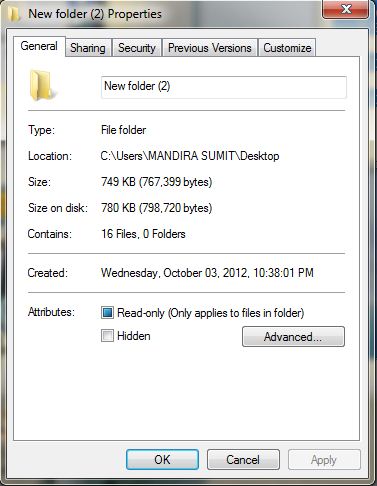
It is fully hidden. I mean that some virus has been detected my folder.
Tell me how can I get back my documents folder with my all documents?

- 1150 views
- 3 answers
- 0 votes
Hi there!
I use my laptop in my home. I read many forums about PC troubleshooting.
But I don’t know a simple option.
How to check my hardware configuration about 32/64 Bits?

I want to know this answer for installation utilities software and playing games.
Because, I like computer game too much. But some games have 64/32 bits supported.

How can I know this?

- 1006 views
- 3 answers
- 0 votes
I installed Windows XP SP2 and put it on auto update as usual. Everyday it installed updates normally but then I noticed some problems with I system. I thought this could be due to automatic installation and so I put automatic updates to offline mode. And I started receiving error “0X87FF054F”. I Google a lot for this but could not find any reason and the solution as well for this error.
I am using Windows XP, as mentioned with 512 RAM and 2.4 GB Processor. Anyone knows solution for this error then please tell me.

- 1493 views
- 2 answers
- 0 votes
The Error Loading Operating System error appears when your operating system fails to load properly. This error is localized to the Microsoft Windows XP operating system, so users of other operating systems should not face this problem.
Essentially, the Error Loading Operating System occurs at a point between the computer’s BIOS running checks on the system’s hardware and the actual launching of the operating system. This error is usually accompanied by a black screen and occurs directly after the installation of Windows XP

- 1026 views
- 2 answers
- 0 votes
I was in the middle of an installation when suddenly there was a power outage. After the power is back, my internet connection still did not work. After I got my internet working, my installation did not resume. And it seemed like I lost something on my computer.
I would like to know what are those that were lost in the computer, or is there a way at all. And I would like to resume my installation because I already waited an hour for the installation process to finish and I don't want to wait again.
Thanks!

- 1237 views
- 2 answers
- 0 votes
Hi

- 846 views
- 2 answers
- 0 votes
I am facing a problem that the mouse is not working on the computer while erasing the information from the computer. I changed the mouse on the computer but it still doesn’t work. To start the disk wiper I need to restart my computer. But I am unable to reboot it without using the mouse. Kindly tell me how to restart the system without the mouse.

- 1614 views
- 2 answers
- 0 votes
I am using XP operating system. Whenever I go on my computer after a few minutes it just restarts for some reason. I have tried to restore my computer but can't because it will restart before it finishes. How can I stop the restarting or restore my computer when this is happening. This is very difficult to work in my computer.
How can I restore my computer when the computer just randomly restart?
- 902 views
- 2 answers
- 0 votes
My XP operating system create some problem. My operating system has been changed my desktop feature where I lost my important document. Now I want to Restore my computer in back date.
But my Restore feature on my computer is not working and my computer provides an error which is “computer could not be restored to this date. No changes have been made. Try another date. ” Try another date same thing happens. All of my personal document were deleted from my computer, and I want to get them back.
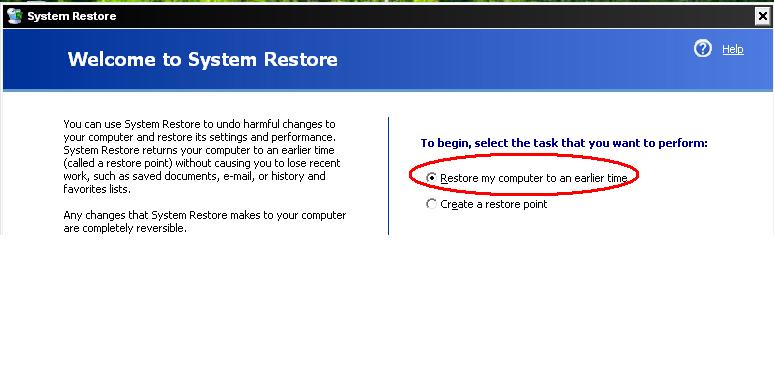
How can I restore my computer to an earlier time?
- 926 views
- 1 answers
- 0 votes
Latest Articles

How T-Mobile Postpaid Plans Improve 5G Connectivity And Mobile Value For Everyday Users

Skill-Based Slots Trend Or The Future Of The Industry

Top 7 Tech Features That Make Online Games Addictive (In A Good Way)
Latest Blogs

Top 10 New Laptop Entrants That Shook The Public

10 Facts About The Dark Web

Top 10 Latest Steam Cleaner Machines
Latest Tips

Top 10 Internet Monitoring Software

Top 10 Best Partition Manager Software
