


Windows 7
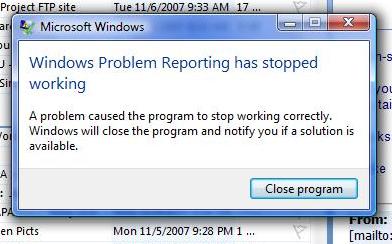
I yesterday installed Windows 7. Everything goes fine during the installation process but just after completion, whenever I log in to the system, the below mentioned error occurred.
- Microsoft Windows
- Windows Problem Reporting has stopped working
- A problem caused the program to stop working correctly.
- Windows will close the program and notify you if a solution is available.
Close program.

- 2549 views
- 1 answers
- 21 votes
Hi,
My computer shuts down and reboots randomly and I keep receiving this error.
Windows Error

Windows has recovered from an unexpected shutdown.
Windows can check online for a solution to the problem.
Most of the time, when I left my PC open with its screen saver on, for a few minutes, it will instantly freeze and the error from Microsoft Windows will appear. It has options to check for online solutions but I can't even move the mouse so all I can do is to force close the whole computer by pressing the power button on its CPU.

- 1741 views
- 2 answers
- 20 votes
I lost my System Restore when my computer was hit by a virus. It didn't work since then and I am receiving the error above whenever I try to perform this task. I've been searching for solutions online, but no one ever gave me correct and detailed procedures on how to properly fix this.
System Restore
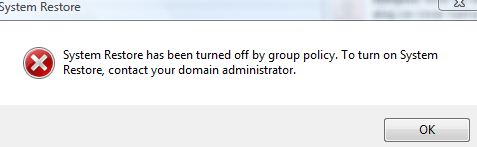
System Restore has been turned off by group policy. To turn on system Restore, contact your domain administrator.

- 1851 views
- 3 answers
- 20 votes
Every time I am trying to use the System Restore on my Windows 7, I get this error;
System Restore.
I need to make a restore point due to I am always prone to viruses and I have numerous attacks for the past months. Reformatting my system repeatedly may cause harm and damage to my system so I want to make an easier way to fix the error.
Just last week, my computer was attacked by a Trojan Virus but I managed to clean my system again. I have read different forums hoping that I can find someone who can help me with this. Anyway, below is the list of the troubleshooting I did to fix this:

- 1625 views
- 3 answers
- 20 votes
Hi,
Recently I have reformatted my computer and I have installed the Operating system, using the Operating system disk which I have got during the time of purchase of my computer. I have the OS Key printed on the sticker, which is fixed on my Computer CPU.
When the installation prompts me to enter the serial key, I just enter the same which is in the Sticker. But the code was not accepted. It’s a computer purchased before three to four years, so I may not be able to call the tech support assistance since the warranty is over . Really looking for someone to help.

- 1094 views
- 2 answers
- 20 votes
I have Windows 7 x64 computer, the power went off after booting. Upon restarting, this error appears on screen:
BOOTMGR ERROR
 I insert my Windows 7 Installation disk, after the window, "Press any key to boot from CD/DVD" Another error appears instantly.

The file corrupt.

- 1296 views
- 2 answers
- 20 votes

- 1297 views
- 1 answers
- 20 votes
Hi,
I'm planning to purchase netbook Fujitsu Lifebook MH 330 with specification Intel Atom N455, 10" LED Display, 1 GB DDR 3 RAM, 250 GB HDD.
The only problem is the operating system its using is MeeGo ( Linux ). I was wondering if I can installed Windows 7 in the netbook and which kind of Windows 7 can be used to install in it ?

- 1667 views
- 1 answers
- 20 votes
I can’t change my background in Win 7 starter. I think Windows 7 doesn’t support changing of background and theme. Is there any other way to do this?
I want to customize the look of my computer desktop, change the background picture and themes. I’ve seen a laptop somewhere in the shopping mall, I’m not sure what kind of OS there using but I think it was a Windows 7 version. It was really amazing, when you click on the windows start orb a butterfly will appear and keeps flying on the Windows for a couple of seconds and after that it will land somewhere the Windows start orb.
Does anybody know how they did this ? I really want to customize my desktop. Please help me with my desperation.

- 1443 views
- 1 answers
- 20 votes
Hi,
I made a fresh install of my operating system due to a conflict on my antivirus and my internet connection. I could not figure out what the problem is and there are lot of errors on my computer so I made a clean install.
I am running a Windows 7 Ultimate x64, with 320 GB Hard Disk and 2 GB of RAM. I have a partition before but intended to delete the other partition to lessen the errors I am receiving. After the installation, I installed the applications, software’s, messenger and browser needed. But an error appeared upon opening an application I recently downloaded.

- 4384 views
- 2 answers
- 20 votes
Latest Articles

Top 7 Tech Features That Make Online Games Addictive (In A Good Way)

Tiny Systems That Make Apps Stick

Free cloud mining is coming! RICH Miner launches mobile mining, everyone can earn cryptocurrencies
Latest Blogs

Top 10 New Laptop Entrants That Shook The Public

10 Facts About The Dark Web

Top 10 Latest Steam Cleaner Machines
Latest Tips

Top 10 Internet Monitoring Software

Top 10 Best Partition Manager Software
