


Hardware
I am using a HP keyboard at first it was working well and then one time i spilled a coffee in it. after i turned on the computer and start working in my documents i found out that the keyboard is not following the right letters when i hit a key instead the other letter appears on the screen(example: when i hit the key Z, letter U appears on the screen).
Can anyone please help me with my problem?

- 1195 views
- 2 answers
- 0 votes
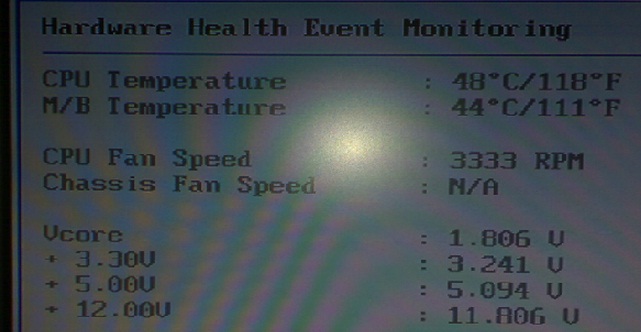
Base on the Vcore Temperature Monitoring in the BIOS, how can I tell if my Power Supply Unit has problem? Is there an indication that the power supply unit is about to fail?
I notice the Temperature of the Vcore in the BIOS, some computers has higher than the +1.8V, +3.30V, +5.00V and +12.00V and some computers has lower than the +1.8V, +3.30V, +5.00V and +12.00V.

- 1029 views
- 1 answers
- 0 votes
My mouse and keyboard have suddenly stopped responding.
I connected my mouse and keyboard to other computer and it is still functioning.
I also connected other PS/2 type mouse and keyboard to my motherboard which I have a problem and it resulted to non-functional mouse and keyboard.
How can I repair my PS/2 port?

- 1770 views
- 2 answers
- 0 votes
When I connected a new hardware device to my computer, Windows tried to find and installed a software driver for the device. Unfortunately, I haven't seen a notification that a driver is unsigned, has been altered since it was signed, or can't be installed by Windows. How can I decide which drivers are safe to install?

- 972 views
- 3 answers
- 1 votes
Scenario: Mouse and/or keyboard not working after deleting entries in the window registry (regedit) to fix CD/DVD problem (upper and lower Filters)
Reason: There are three entries upper and lower in the registry. The first entry is for the CD ROM. This is the only entry you will need to delete in order for your drive to work.
The second entry is for the keyboard and mouse and you should not delete it or mouse/keyboard will not work at the next restart.
System restore can do the trick but obviously you cannot do it because your keyboard and or/mouse is not working.
You can try this method instead: Restart your computer and before the Windows XP logo shows, repeatedly press F8. Choose
Last Known Good configuration.

- 4193 views
- 2 answers
- 0 votes
I have a problem in my HP PSC 1315 all-in-one printer, scanner and copier.
After I turned on that device then I print a document it will successfully print but it will never scan any document. And if I scan at first from the time I turn it on it will successfully scan but it will never print again.
I tried to reboot my computer and turned off that device but not happened.
Please help.

- 3501 views
- 2 answers
- 0 votes
I used my WIndows 7 laptop all day yesterday and I had no problems with it. This morning though, when I turned it on, it would restart itself repeatedly. At first I thought it was a virus, but my scan picked up nothing and someone suggested it was a hardware problem. Before I bring this laptop to a computer hardware shop, are there possible work arounds?

- 1008 views
- 2 answers
- 0 votes
Some letters of a laptop my brother just gave me were having problems and are not typing at all. They are the letters W, E, R, S, D, X and the #3. Is there anything I can do with this or do I need to bring this to a computer shop to get fixed? It’s running on Windows XP.

- 1075 views
- 2 answers
- 0 votes
I was working late last night with numerous projects to be finished at home when my desktop monitor suddenly turned black. I checked the CPU but a LED was blinking indicating it has power.
I checked the physical connection from the monitor to the power outlet and it seemed to be fine. Is there something wrong with my desktop monitor?

- 885 views
- 1 answers
- 0 votes
Hello! I have a problem on the screen of my Toshiba Satellite (M70-144). It has lines coming down in a block about 3 inches wide. Another block of lines again about 3 inches apart from the 1st one. I changed the screen resolution up to high 32 and got more lines instead. When I moved the mouse to slide up or down the page, it would leave a red trace. Any fix for this?

- 989 views
- 2 answers
- 0 votes
Latest Articles

How T-Mobile Postpaid Plans Improve 5G Connectivity And Mobile Value For Everyday Users

Skill-Based Slots Trend Or The Future Of The Industry

Top 7 Tech Features That Make Online Games Addictive (In A Good Way)
Latest Blogs

Top 10 New Laptop Entrants That Shook The Public

10 Facts About The Dark Web

Top 10 Latest Steam Cleaner Machines
Latest Tips

Top 10 Internet Monitoring Software

Top 10 Best Partition Manager Software
