

No of visitors who read this post:
167
Category:
Photos / Graphics Soft.
Type:
Question
Author:
James a watkins
Where do I get a walk through on how to change the Adobe Photoshop's default magnification?

- Login or Signup Now to post comments

Sadly there is no way by which you can change the default magnification of Adobe Photoshop. The only thing that you can do is open the image in Adobe Photoshop first and then zoom in/zoom out the image with the help of Zoom tool
present on the sidebar as shown in the picture below:
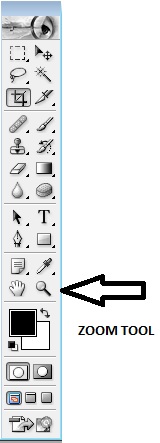

As soon as you click on the zoom tool, a toolbar like this would appear below the upper menu bar as shown:
From here you can choose accordingly the zoom-in magnifier or zoom-out magnifier
You can also use the following keyboard shortcuts instead too:










