Hi,
I salvaged one computer desktop from our stock room. I installed Windows XP and MS Office 2003. The specs of the computer are as follows:
- Intel ® Core ™2 Duo CPU
- E4400 @ 2.00 GHz
- 2.00 GHz, 504 MB of RAM
Everything seems to be fine, but I observed that the computer’s performance is a bit slow. Connecting to the internet, opening folders and even printing takes time to accomplish. Also a balloon message kept coming saying that virtual memory is low.
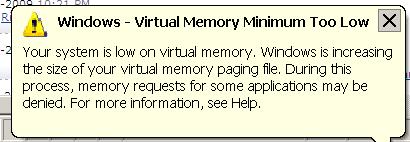
Windows - Virtual Memory Minimum Too Low
Your system is low on virtual memory. windows is increasing the size of your virtual memory paging file . During this process, memory requests for some applications may be denied. For more information, see Help.
How can I solve this problem?

- Login or Signup Now to post comments

In HDD we allocate some space for our Windows OS. Widows OS uses this space like RAM. For any reason, Virtual memory is low then you will get this message. To increase the virtual memory follow these steps.
Now we are done. Emily
Hi
Based on the specifications of your computer, that is only 504mb of RAM/MEMORY. If you are experiencing this problem, you are probably running huge applications that will occupy the ram and same goes for your hard drive in its virtual memory as if it were ram. The solution to this problem is to add additional RAM to reduce the page file for your hard drive. You need to populate the RAM/Memory slots in order to keep those processes in your RAM without sacrificing much of your page file from your hard drive. Another solution to get rid of that warning message is to close unnecessary programs that is not used and you only open applications or programs that is within the range of capacity in your machine. Hope this simple reminder help thank you
Hello Dear,
As you said, you have 504 MB of RAM installed on your computer.
It is too low to perform well, so the computer is showing you the “low virtual memory” error.
You can increase virtual memory space without adding any hardware.
It will just take space from the hard disk, and it will work just like RAM.
Now, find the properties of your system by typing "sysdm.cpl" in RUN menu, and then click on Advanced.
Then, in new window, click on settings, which is in front of the virtual memory tab.
Then, click on virtual memory.
Here, you will see two little boxes.
Enter the minimum amount that you want to assign to virtual memory in MB, and the lower box will automatically enter the maximum size of virtual memory. Then, press apply and OK.
Then, restart your computer.
Thanks.