Does someone here know how to remove Windows 8 Developer Preview?
I need a step-by-step guide to do this.
Thanks.
Uninstall Windows 8 Developer Preview
Hi Joem dela paz!
Here is the step by step guide as you requested.
1. Hit windows button on your keyboard to open the Start menu and then type 'msconfig'. Pressing enter will take you to System Configuration box.
2. Now go to the 'Boot' tab where you will see "Windows Developer Preview". Select it and then hit 'Delete' button down there.
.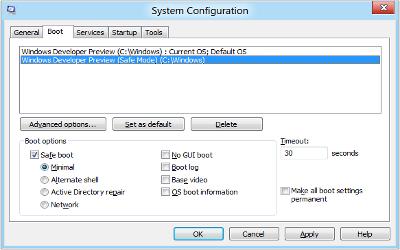
3. Now apply these changes by clicking Apply button. After that click 'Ok' and the box will be closed.
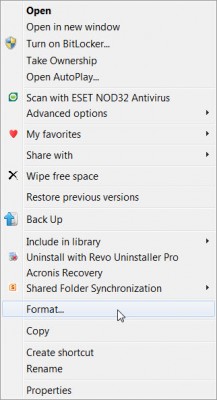
4. Now for formatting the partition containing Windows 8 Developer Preview; open 'My Computer', right-click the partition (C, D, E etc.) where Windows Developer Preview is installed and click 'Format' which will format that drive and you'll have your disk space back.
I hope this has helped you.
Regards.
Uninstall Windows 8 Developer Preview
Hi there!
You were asking how to uninstall your Windows 8 Developer Preview Program. Please try this, First you go to your Home button, go to your control panel and you can see lists of settings including a program with a significant “uninstall a program” under it. Then you go to programs and features and then you must choose and or find your program that is.
Windows 8 developer preview” and a pop-up box will come out saying: Are you sure you want to uninstall Windows 8 Developer program?
Then of course you click yes, and Windows installer will start removing your program in a few minutes, then you can restart your computer after and voila!
Your program is removed.
Hope this helped.
Uninstall Windows 8 Developer Preview
I followed your steps, Galarpe Miloni.
Thank you very much. I run msconfig > System Configuration > Boot tab > Select windows developer preview > delete > apply > ok,
Then formatted the partition.
Thanks for your help.