No of visitors who read this post: 1160
Category: Ubuntu Linux
Type: Question
Author: Abdosama
No votes yet

Hello everybody,

I have a problem with my Ubuntu 11.04 (natty), here is the problem; when i waking up from suspend or hibernate mode, i can't hear any sound even if the volume bar set to maximum. My PC is a Fujitsu Siemens Pi 1536, here the the result after taping the command "lspci" 

$lspci
 
...
00:1b.0 Audio device: Intel Corporation N10/ICH 7 Family High Definition Audio Controller (rev 02)
...
Any one can help !!
 
Thank you, 


Comment viewing options

Select your preferred way to display the comments and click "Save settings" to activate your changes.

#

Ok before I start let me be clear that this is just some of the many solution to your problem.

Now, Try These Troubleshooting Tips.

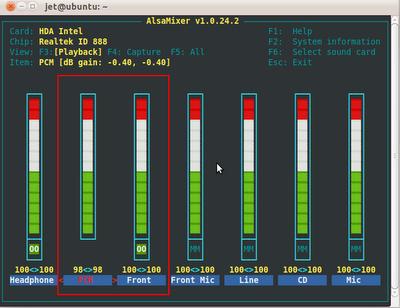
Unmute your sound with alsamixer

1. Launch it using this command

     alsamixer

  If it is not installed, install it with this.

     sudo apt-get install gnome-alsamixer

2. Use your keyboard and unmute PCM and also Front.

That should be it then press ESC to exit.

Restart ALSA Driver

1. If you did not see your audio device in the Hardware section list the restart the alsa audio driver using this command.

    sudo alsa force-reload

    reboot your system

Reinstall Your Sound Modules

1. Try to install your sound modules using this.

    sudo aptitude reinstall linux-generic

    Reboot and Done!