No of visitors who read this post:
1855
Category:
Photos / Graphics Soft.
Type:
Question
Author:
Janetdschall
Hi all
Just I downloaded 3ds max 2010 and installed it.
I did not find any problems when I was installing or downloading it but when I make an attempt to start the program to utilize it I was getting a error message, A software problem has caused 3ds Max to close unexpectedly
I need to solve this problem. Please help me. It’s urgent.
Thanks in advance.

- Login or Signup Now to post comments

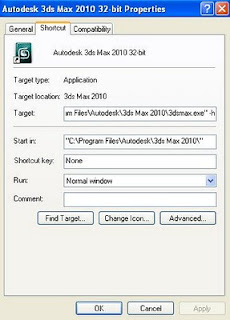
That error may be occurring because the settings of the graphics card are wrong. What could have happened is that you may have set the 3ds Max to use Direct3D which your computer graphic card doesn't support. The following are the steps to help you solve this problem:
After the above process, you will need to double click on the 3ds Max shortcut icon so that the the system cvan prompt for Direct3D Driver Setup and not start 3ds Max immediately. After that click on the Revert from Direct3D button. You will then have to choose OpenGL as your graphics driver setup and then click OK to finish. After that you will have to get rid of the -h from step 1.
Regards,
Carl
Hi Janet,
Did you download a zipped file? Because if you do, sometimes if it a small file (just a part of the big file) that is corrupted the downloading and installation process won't detect it. This might be the one causing the problem.
But since there's is no error encountered during installation, most likely than not, you were able to undertake a wrong configuration for your software which your graphic card doesn't support. It might be that your 3ds Max uses Direct3D which is not supported by your VGA. You can follow the following steps to check and edit your configuration:
1. Right click on the shortcut icon and click Properties. Copy this to the Target box : "C:\Program Files\Autodesk\3ds Max 2010\3dsmax.exe" -h (assuming you have installed 3ds Max in the C:\Program Files).
2. Click OK
3. Double click on the 3ds Max shortcut icon
4. Click the "Revert from Direct3D" button
5. Now select "OpenGL" as your graphics driver setup. Click OK when finish.
6. Repeat step 1 except that you will remove the -h this time. ("C:\Program Files\Autodesk\3ds Max 2010\3dsmax.exe")
7. Click OK
8. Open 3ds Max again. It should run smoothly.
Another solution that you can take is to download again the file from a trusted website and make sure that there won't be internet connection time out as to avoid the files to be corrupted. But of course this solution will be the last remedy you want to take. It will be time-consuming and tedious work.
I hope it helps you.