

Hi,
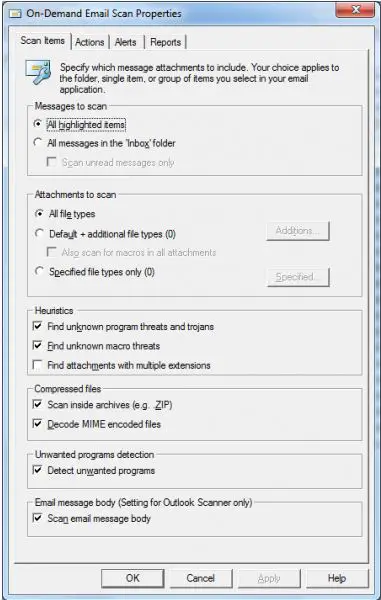
I have McAfee virus scanner. I have installed it after installing the Microsoft Outlook. That configured virus scanner for the emails. But I don’t know how to set it up to scan all the files. It has the following configuration screen where I can select .zip files. How to enable all files?
Thanks.

- Login or Signup Now to post comments

Hello Aisha,
Thanks for sharing your problem with us.
Dear you have been worried for nothing.
In fact when you will download your all emails in outlook inbox, all the emails will be scanned automatically by any antivirus.
You are using McAfee so i want to tell you something about it.
Please keep your software up to date because an updated antivirus will kill the latest threats and viruses.
Here you told also that you have selected .zip file how i can select all so watch in your uploaded picture that there is written Under the compressed files, scan inside archive (eg. .zip) it shows that compressed files will be scanned. It is just an example given that .zip. It will scan your all files attached with the email.
I hope this will help you to be satisfied.
Thanks









