I would like to learn from anybody who is expert in word regarding deleting rows and columns in a table. I created some tables but some columns and rows are unwanted. Can someone explain me how to delete?

- Login or Signup Now to post comments
I would like to learn from anybody who is expert in word regarding deleting rows and columns in a table. I created some tables but some columns and rows are unwanted. Can someone explain me how to delete?
According to your question it seems that you are very new to Microsoft word. Anyway it is easily can delete any rows or columns in Microsoft word. I will explain it through an example.
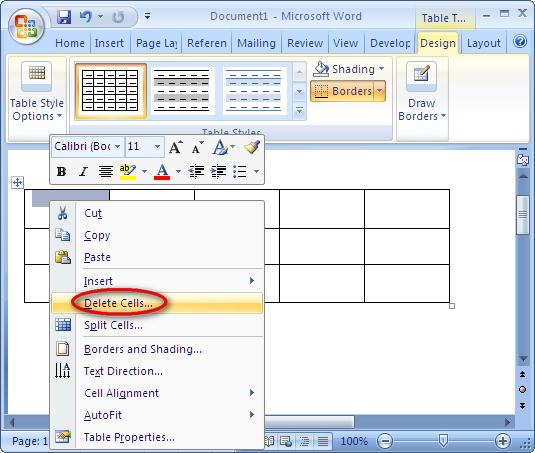
Please see the below image.
Select rows and right click on those. And click on delete cells.
In the next window tick on the “delete entire row”.
Then those two rows will have been deleted.
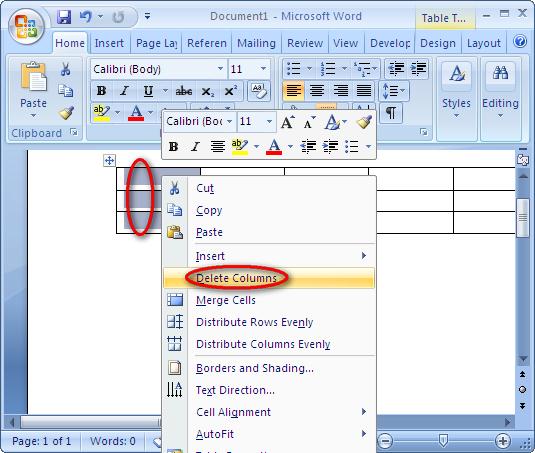
In the same way you can . Select columns that you want to delete and right click and click on the delete columns. Then the selected columns will have been deleted.
Hi Gordon,
I have given a clear key point to do your work easily. Please use them correctly.
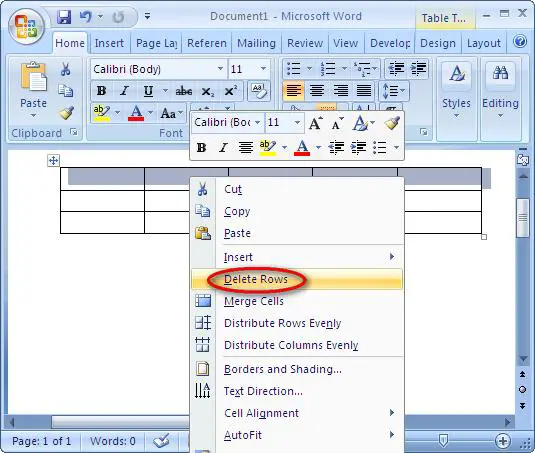
Delete a row
Delete a Column.
Please, if you need more details, use below link. Which I have given.
Thanks.