Submitted by Cathy emrald on Sun, 2012-07-22 01:55.
Comment Id: 69908
Hi.
Have you tried to uninstall and reinstall False 7? If you already tried that and the problem still persist, try to create another user profile in your Windows.
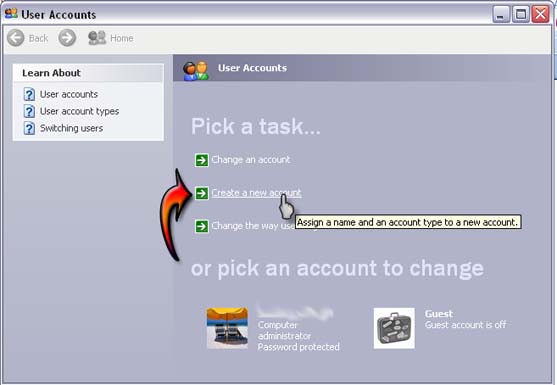
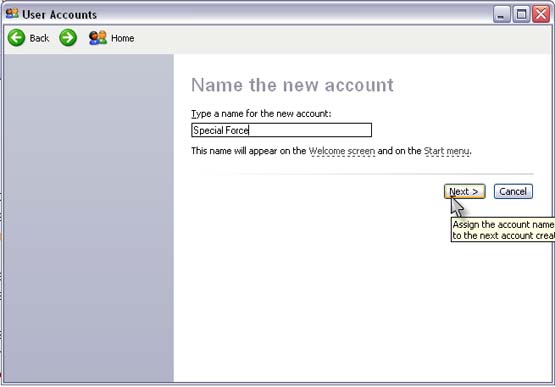
Switch to Admin account then go to Start and click the small picture on the top right side under your Start menu to open the User Accounts window. Then click Manage Another Account and follow the on screen instructions. If after doing the above steps and you are still having the same problem, try to uninstall SF and the MyGame Launcher. Restart your computer and then reinstall back SF and the MyGame Launcher. Then do the Manual Patch and then restart your computer again.
Do not forget to disable any antivirus software that is currently installed and running actively in your pc before reinstalling SF and MyGame Launcher.
Hi.
Have you tried to uninstall and reinstall False 7? If you already tried that and the problem still persist, try to create another user profile in your Windows.
Switch to Admin account then go to Start and click the small picture on the top right side under your Start menu to open the User Accounts window. Then click Manage Another Account and follow the on screen instructions. If after doing the above steps and you are still having the same problem, try to uninstall SF and the MyGame Launcher. Restart your computer and then reinstall back SF and the MyGame Launcher. Then do the Manual Patch and then restart your computer again.
Do not forget to disable any antivirus software that is currently installed and running actively in your pc before reinstalling SF and MyGame Launcher.
Hope it will work.
Good luck!
Cathy Emrald