Asked By
Mia Grey
220 points
N/A
Posted on - 06/25/2011

How can I share my USB Modem Internet Connection to WiFi?
I have a Wireless-G Broadband Router and one laptop. I want to share my USB Modem Internet Connection to my laptop via WiFi. How can I do that?
By the way, my router has been already configured and everything was set because I had a broadband internet connection before. The only problem is how my desktop computer can share, my internet connection to the router, so that the internet connection will be broadcast by the router via WiFi.
Please give me solutions.
How can I share my USB Modem Internet Connection to WiFi?
You must configure your desktop computer with Internet connection sharing (ICS). Internet Connection Sharing works with most of the Microsoft operating systems. To be sure, consult your manual or terms and conditions of the operating system purchased.
Here is how to do this:
-
Select Start and then select Control Panel.
-
It is then to select the network and Internet connection.
-
Select Configure or change your home or small office network.
-
When you see the wizard, click Next.
-
Click Next to go to the checklist for the creation of the network.
-
Select the option 'this computer connects directly to the Internet. The other computers on my network connected to the Internet through this computer.
-
Select the adapter or modem connection where these Internet.
-
You can leave this stage but you can change the field that you want. Click Next.
-
Below is to establish their working group. The default value MSHOME, make sure that your working group on the client computer is the same as on this computer. Click Next.
-
Select if you want to share files and printers, or you can disable file and printer sharing.
-
Click Next.
-
Select only end of the wizard, click Next.
-
Click Finish.
Now and interconnections of LAN equipment to WAN router. Turn on the router and connect the laptop to the WiFi network.
How can I share my USB Modem Internet Connection to WiFi?
Wireless-G Broadband router is definitely a wireless ready equipment. It will always broadcast wireless signal regardless if it doesn't Internet connection or not. As long as the router is on, then it will send a Microwave type of signal.
Your computer most likely using wired connection and you want your laptop connects by using wireless. Laptop should have wireless card installed, built-in or not.
To identify laptop if wireless ready, do the following;
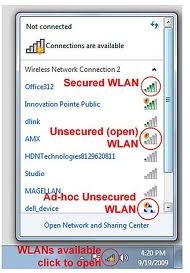
Go to Start, Control Panel, Network and Internet.
Click on Network and Sharing Center then Change adapter settings.
In this window, you should have Wireless Area Network – WAN.
Right click on WAN and select connect/disconnect.
Once click, a list of wireless network is detected and yours should be the top with stronger signal.
Click on your network and that should let you connect.
To identify if router broadcast wireless signal, do check this out;
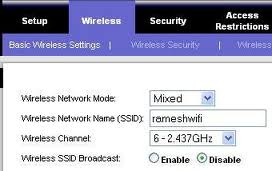
-
Open web browser, type 192.168.1.1
-
Log-in to this GUI using required credentials.
-
Go to Wireless tab and look for wireless SSID, this gives you idea if it broadcast of not by knowing the network is enabled.
-
If SSID says broadcast, and it was set to Yes then everything is all set.