

No of visitors who read this post: 292
Type: Question
No votes yet

Microsoft Forefront UAG was installed on our computer. I decided to update it because they already release the SP1 of it, so I manual download the package and try to install it but in the installation this error just pops up, error message didn't indicate that much of what is the error.
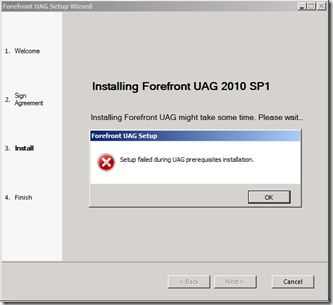
Forefront UAG Setup

Setup failed during UAG during prerequisites installation.

Comment viewing options

Select your preferred way to display the comments and click "Save settings" to activate your changes.

#

Hi Lanford,

It is not any problem if we know the reason. Of course, every problem is so. Because problem is not any problem after solution. Am I correct? But it is quite funny.

If you get rid of the problem, just leave typical installation and choose manual and follow the screen instruction; you will see that everything is fine.

Thanks for asking.

Hathy

# (Solution Accepted)

You can resolve your installation, upgrade and administration issues. Just follow these steps to solve this problem.

1.    Before running the SP1 installation, a restore point should be added to the Forefront UAG server.

2.    Installing SP1 on a server running Forefront UAG that has not supported and active configuration.

3.    I would recommend you that you do not have other applications that are in progress during the installation of SP1 on an existing Forefront UAG server. If you will not follow this process then, you will receive the message that you mentioned above during SP1 installation.

4.    If you receive this error, do the following:

·         Reboot your computer.

·         Wait for other installations that are in progress to complete.

·         Reinstall SP1.

You will not face this issue again. Thanks,

—

Maud Matland









