Submitted by Zile Gaur on Thu, 2012-03-22 16:33.
Comment Id: 50919
Hi
Do you try to copy multiple files holding down the ctrl key and select files by clicking and suddenly you get files are copied? To solve this problem
For Windows Xp
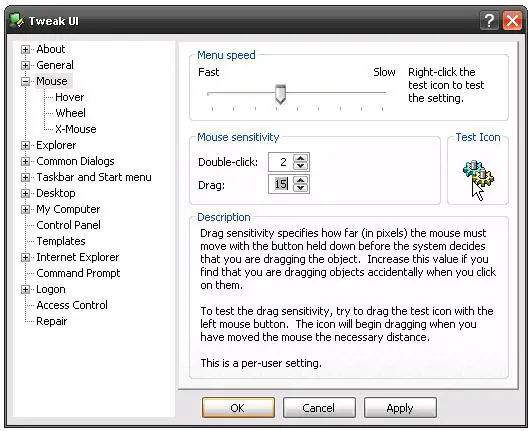
For windows Xp you can use Tweak UI. It is a free utility provided by Microsoft. You have to change the value “Under Drag” something more than 4 pixels.
For Windows Vista
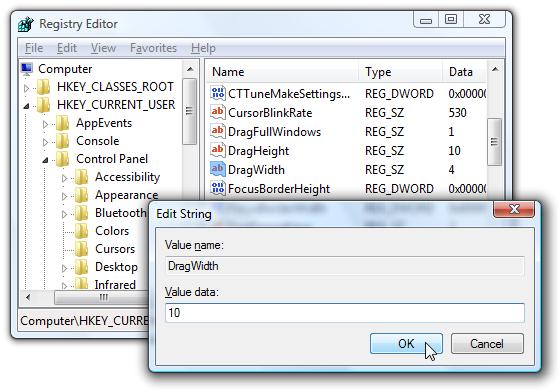
For windows Vista from Star menu go to run and type regedit.exe and press enter. It will run the registry editor of your OS. In the registry editor browse HKEY_CURRENT_USER\Control Panel\Desktop and increase the value width from 10 to 20.
You can experiment with your values changing for the perfect value for you.
Submitted by Rosales blair on Thu, 2012-04-12 07:57.
Comment Id: 53653
Frankie,
If I am not forgotten, I think you have caught up a w32/brontoc or something else. Because one of the indication of this virus is that it creates and duplicates files! In and out of the registry. That’s why i recommend that you should use:
1. Drive Scrubber (you can find it on web, its free version is available to download)
2. NOD32 Antivirus (in my experience this is the
Best antivirus)
Submitted by Frankie Hilton on Wed, 2012-04-18 17:38.
Comment Id: 54995
Thank you ZIle Gaur. You are absolutely right! I reduced the drag value to 4 pixels like what you said and the duplication of files have already stopped. Many thanks TechyV!
Hi
Do you try to copy multiple files holding down the ctrl key and select files by clicking and suddenly you get files are copied? To solve this problem
For Windows Xp
For windows Xp you can use Tweak UI. It is a free utility provided by Microsoft. You have to change the value “Under Drag” something more than 4 pixels.
For Windows Vista
For windows Vista from Star menu go to run and type regedit.exe and press enter. It will run the registry editor of your OS. In the registry editor browse HKEY_CURRENT_USER\Control Panel\Desktop and increase the value width from 10 to 20.
You can experiment with your values changing for the perfect value for you.
Best of luck
Frankie,
If I am not forgotten, I think you have caught up a w32/brontoc or something else. Because one of the indication of this virus is that it creates and duplicates files! In and out of the registry. That’s why i recommend that you should use:
1. Drive Scrubber (you can find it on web, its free version is available to download)
2. NOD32 Antivirus (in my experience this is the
Best antivirus)
You can find it on the site www.eset.com
I am sure your problem will solved.
Thank you ZIle Gaur. You are absolutely right! I reduced the drag value to 4 pixels like what you said and the duplication of files have already stopped. Many thanks TechyV!