


Windows Certificate Error help needed

Hi,
I have a desktop computer with Ethernet connected with my router and router connected with my modem. I have a laptop that can connect to the same router wirelessly. My fiance was trying to connect another laptop, but encountering an error,
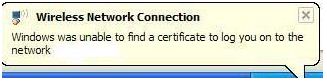
Wireless Network Connection
Windows was unable to find a certificate to log you on to the network.
I am confused on what certificate is this. My router is a D Link DIR 615 and has a security 10-digit WEP key. I clicked on the Start Menu, Programs, Accessories, and then Network Connections. I have right-clicked on my connection to select its properties, and then select the Authentication tab then unchecked IEEE 802.1x authentication for this network. Then we tried to connect again. The error on certificate disappeared, but I have a windows cannot connect you to the network error. And I totally don't have any connection with the third device. I already made a series of Reset on my D Link Router, but it didn't work.
I erased the WEP key temporarily just in case it is interfering and causing this error to appear. How can I resolve this? We have a project that needs to be finished, and it requires an internet. So if anyone knows or has a solution to resolve the issue please let me know. By the way, I am using Windows XP on my desktop and Windows Vista on my laptop. My fiancé is using Windows XP too.
Thank you!













