


Virtual Memory Too Low Balloon Error

I am receiving error at the bottom left of my screen. It's randomly appearing without warnings. The error I am receiving is:
I deleted some useless files to be able to have free spaces. When I look in My Computer then right click the C drive and go to Properties I still have a lot of remaining free spaces. I'm running Windows XP Home Edition Service Pack 2 before but now I downloaded an update to make it Service Pack 3.
Since then, this error keeps popping on my screen. I also tried defragging my system. And also cleared all my browsers history and cache. This pesky error is really pissing me off. I adjusted the setting for this error by right clicking My Computer then Properties then advanced tab and the settings in the panel. The error stops popping for a while. But after a week, the error is there again. If anyone here who had the same problem and luckily fixed it, please help me.
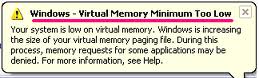
Windows – Virtual memory Minimum Too Low
Your system is low on virtual memory. Windows is increasing the size of your virtual memory paging file. During this process, memory paging file. During this process, memory requests for some applications may be denied. For more information, see help.
My laptop is Toshiba satellite a200 with pre installed Windows XP Pro SP2.
RAM is only 1 GB
Hard disk size is 160 GB
Please state on your replies a step by step procedure on how can I prevent this error.
Thank you in advance.
LhenP













