


Windows XP
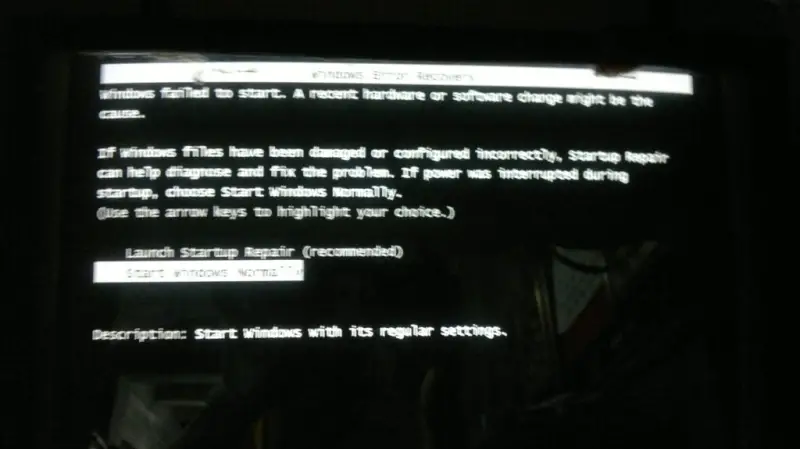
I always encounter the error message saying Windows Error Recovery every boot. The picture illustrates the error that always appear on reboot. If you select Launch Repair, it will repair but after a while a blue screen with some error message appears and then when you reboot again, this screen will appear.
Does anybody here know the solution to my problem?

- 1440 views
- 2 answers
- 0 votes
This is the error that always appear every time i try to boot. The computer displays this blue screen before finishing boot. I tried installing a new OS but after the completion of the installation, the same messages appears. My current operating system is Windows XP.
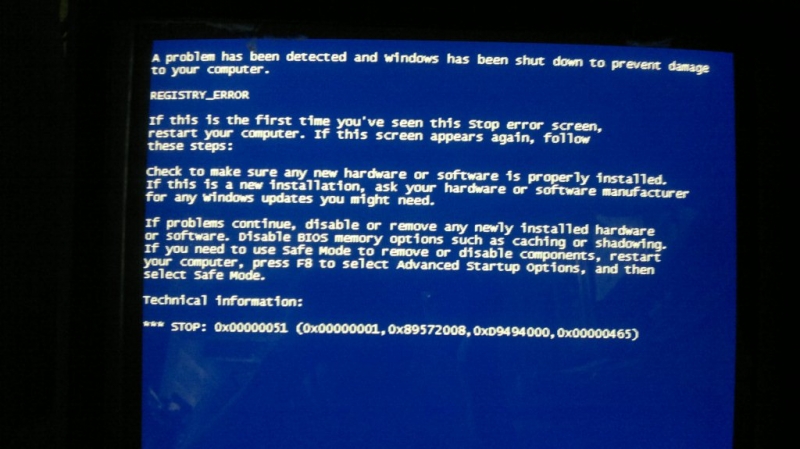
REGISTRY_ERROR
Technical information:
*** STOP: 0x00000051
Can anyone here help me with my problem.

- 1127 views
- 2 answers
- 0 votes
Hi everybody!
Lately I noticed that I have too many processes in my task manager. And I found that there are 10 processes of svchost.exe and they eat up an unusual amount of memory. 4 of the processes are listed under Local service 4 under system and 2 of them are under network system.
Is this normal or do I have a virus? If so what can I do about it?
Thanks in advance.

- 1537 views
- 1 answers
- 1 votes
I have a PC with Windows XP SP2 installed on it.
It was working fine until yesterday when computer froze and a blue screen error message appeared.
When I restarted the computer all I can see is the same blue screen error message.
What could be the possible reason why this happened and what could be the solution for the problem?
I have a PC with Windows XP SP2 installed on it. It was working fine until yesterday when computer froze and a blue screen error message appeared. When I restarted the computer all I can see is the same blue screen error message.
What could be the possible reason why this happened and what could be the solution for the problem?

- 1891 views
- 2 answers
- 0 votes
I am using Microsoft Windows XP Service Pack 2, Also have Internet connection, but after 2/3 months of new windows setup i have got a message for windows license validation. You may be a victim of software counterfeiting, This copy of windows did not pass genuine windows validation. For that i am unable to work perfectly sometimes, now what can I do???

Thanks
Tom Cruise

- 2019 views
- 5 answers
- 0 votes
I have some problems with my Windows XP auto update, everything is okay until I try to install the updates (It's set to manual install and automatic download). The error that my Windows XP gives is that WINDOWS SEARCH 4.0 Cannot be installed, even if I exclude windows search it keeps failing and not installing my critical updates. Any Fixes????
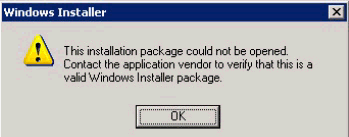
Windows Installer
This installation package could not be opened.
Contact the application vendore to verify that this is a valid Windows Installer package.

- 1713 views
- 2 answers
- 1 votes
Recently I bought one windows XP CD. When I install the CD my operating system is ok and my desktop looks beautiful. After a few days, my desktop become black and if I set any wallpaper after restart it become black. How can I solve the problem?

- 792 views
- 2 answers
- 0 votes
Good day! My cousin in Norway gave me this laptop model Compaq Mini 110c-1100SO that she does not use it anymore because of some technical issues .
1. After 10-15 minutes OS Crash with Blue Screen Errors
2. Norwegian Win XP, I tried to go to the settings but it doesn't work.
3. No CD/DVD rom so i can't use my Win Xp CD to repair/re-install OS
Could someone help me on how to Format and Re-install Win XP OS.
Thanks and More Power!

- 1258 views
- 2 answers
- 3 votes
I am very fond of video games but I normally face a problem to quench my thirst of playing games.
Whenever I install and play a heavy size strategy game like commando, MOHA, Need 4 Speed etc, my screen resolution changes automatically (icons become larger) and I have to change it back manually to normal view size.
What should I do to remove this problem?

- 784 views
- 1 answers
- 0 votes
Lately I've been interested in running DOS programs on my Windows XP. More precisely I've been trying to run Elizabeth:Gloriana an old PC game from Abadonia. The problem is that I can't run it as it is under Windows XP operating system, even with all the compatibility modes it provides (16 bit, 640 x 480 etc.)
I've searched on Google but couldn't find an appropriate answer. I've discovered so far that the game needs to be run in DOS, but I have no idea how to access it or (if possible) to use it in a Windows XP environment.
I've also came across something called DOSbox but I don't know if it is useful for my problem or not.
Thanks in advance
Answer me soon!

- 2520 views
- 3 answers
- 2 votes
Latest Articles

Top 7 Tech Features That Make Online Games Addictive (In A Good Way)

Tiny Systems That Make Apps Stick

Free cloud mining is coming! RICH Miner launches mobile mining, everyone can earn cryptocurrencies
Latest Blogs

Top 10 New Laptop Entrants That Shook The Public

10 Facts About The Dark Web

Top 10 Latest Steam Cleaner Machines
Latest Tips

Top 10 Internet Monitoring Software

Top 10 Best Partition Manager Software
