

I am an auditor and most of the day, I need to work with Excel sheets and Word documents. I need to do a lot of research which makes me end up opening at least 25 to 30 windows and more at the same time.
This is my regular work, I purchased a new notebook HP 3105m Notebook PC, with pre installed Windows 7, AMD Dual Core Processor, 320 GB hard drive, 2 GB memory and AMD Radeon HD(2) graphics.
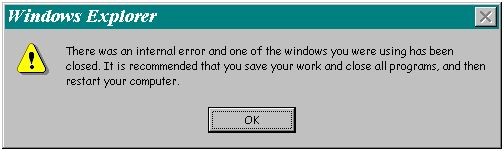
Windows Explorer
There was an internal error and one of the windows you were using has been closed. It is recommended that you save your work and close all programs, and then restart your computer.
OK
- When I have all my windows open, all of a sudden when one of the open windows experiences an error and crashes, the above error message occurs.
- At times I end up closing all the windows ( e. g. All the browser windows) or in a few instances the system needs a reboot to respond to any of my action.
- Is there a restriction to the number of windows open? Do we have a way where we can increase it ??

- Login or Signup Now to post comments

Yes dear, there is a limit of opening more than 30 Windows at a time and Microsoft did not resolve that issue. But you can manually set the limit. What causes the problem is a memory space allocated by Windows for the objects located at the desktop, known as desktop heap. This memory space is known to be very small in earlier versions of Windows.
However, its limit can be increased. To do this, in HLKM/System/CurrentControlSet/Control/Session Manager/SubSystems at the registry, you will see and control a bunch of desktop objects. A sub key known as Windows can be found within this key. Among others, it contains the value "SharedSection=1024,3072" Altering the Shared Section entry to "1024,3072,512". It is important to remember that the comma and the value increase the size of the hidden desktop heap. If in any case, this is unsuccessful, attempt to increase the second of the comma delimited values (e.g. 3072 -> 4096) which are the size limit of any scrupulous desktop load.
To keep you posted: Just to be clear for some peoples on vista / win 7 your default is “1024,3072,512” altering to “1024,4096,512” will create the difference.
Hope your problem will be settled.
My friend,
YES, there is a restriction and limitation of your machine and it depends on your memory and processor. The more Windows or other applications you open, the more memory and processes will be used. Upgrading your RAM(memory) depends on your specification, just read your manual or contact the manufacturer about it.








