No of visitors who read this post: 293
Category: Windows OS
Type: Question
Author: Fern bonnie
No votes yet

Hi TechyV buddies!

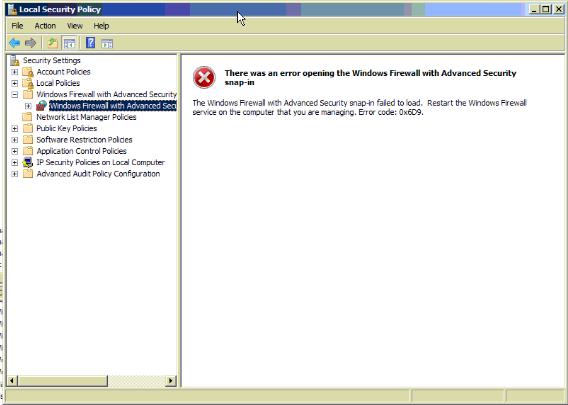
I am having some problem with windows firewall. When I try to open windows firewall I get this error message:

“There was an error opening the windows firewall with Advanced Security snap-in”

Can you tell me what the problem of my windows firewall is? I would really appreciate the effort in helping. Thank you!

Comment viewing options

Select your preferred way to display the comments and click "Save settings" to activate your changes.

#

hello there fern bonnie, the reason you are getting that error is because some of the service has stopped working. i have a step by step guide document that i uploaded for you. link for firewall solution

and this article from microsoft will also be a great help for you problem.  support link

hope you we have solve your problem have a nice day. ^_^

#

Hello Fern,
 
The firewall service that you have is “Windows Firewall” (MPSSVC) which combines both IPsec functionality and Firewall. Usually what causes this to fail is that there are multiple admin security systems failed.
 
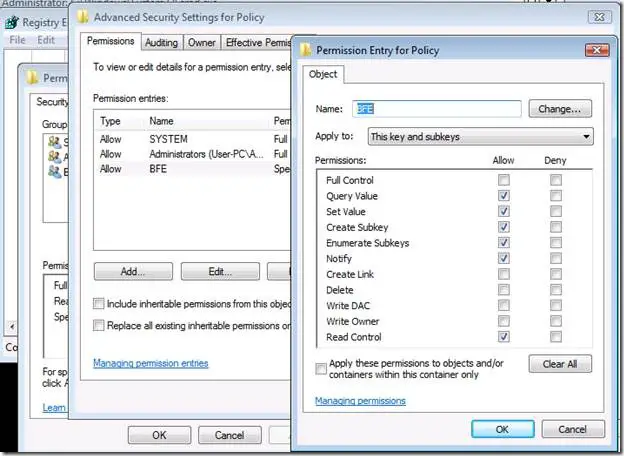
The first check if the Base Filtering engine (BFE) is running.


Well, most of the issues with these services are permission related.
 
This issue is also specific because the settings of firewall in Windows OneCare cannot be modified because it is grayed out.
 
How to resolve the issue:
 
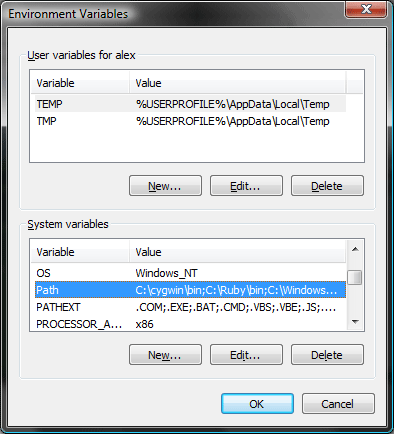
Here are the steps to ensure that the PATH environment variable is consistent and correct.
 
Go to START Menu then CONTROL PANEL. Select SYSTEM icon.
Click the ADVANCED tab and there you will see the ENVIRONMENT VARIABLES.
 
 
Check SYSTEM VARIABLES, that PATH should exists. If it does not exist, create one.
 
 
Click NEW and rename it as PATH then  enter the above path in the variable value.
Click OK and reboot your computer.
 
I hope this information resolves your issue.
 
Best of luck!