Hi,
I am connected on LAN with lots of Windows 7 system. I want to share a file with my friend. When I right click in the file, I do not get the option, share with. Please assist me what is the way, by which we can share the file in Window 7 operating system.
Thanks in advance.

- Login or Signup Now to post comments

Unfortunately whenever you click on a single file in Windows 7, it never shows an option for sharing, instead you can share a file by two easy ways:
But one drawback of using the above approach is that, if both the users are working continuously on a file, i.e. Both users update the status of file from same time to time, then you will be required to copy paste again and again. So folder sharing option is good in such a situation. Especially when you are developing some code files or maintaining a log.
To enable File sharing in Windows 7 you’ll need to configure the advanced sharing settings on your computer. Follow the steps on how to share files on your machine.
Hi there, in windows 7 operating system, it is very easy to share documents with other users. Maybe you are trying to share a file like Document file. If so, then please note you cannot share with right click on a document.
You can do it by making a folder then put your file into this folder the right click this folder then you will see Home group (Read) and Home group (Read/Write). Now you can select what you want.
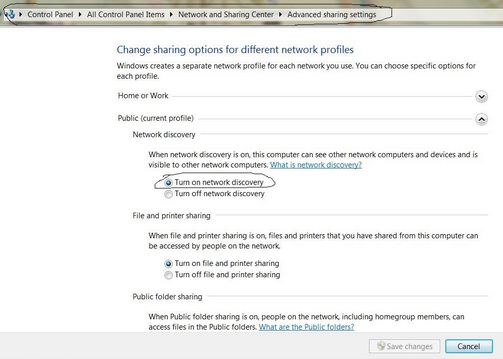
Another way is to file and print sharing from Windows 7. Please open Control Panel then click Network and sharing center; then Click Advanced sharing Settings. Scroll down and check, Turn on file and printer sharing as below picture.
Thank you. very much.
Hi,
In this case you have to install file sharing system on your computer for active it. Follow this process to install it.
1. Run your network connection wizard.
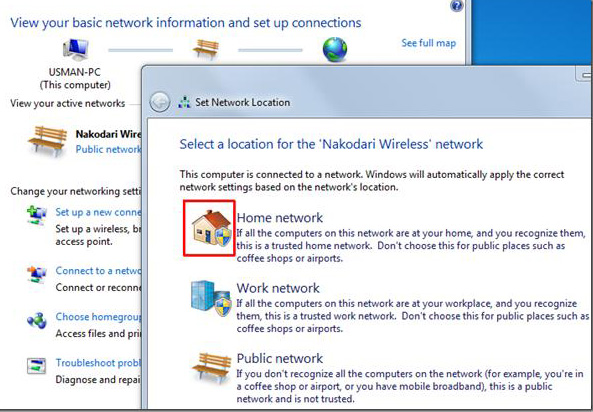
2. Select public network from it.
3. Then click on the home network.
4. Click to view or change a home group setting
5. Here you will find sharing option. Enable all of them
6. You will ask to give a username or password for it.
7. Give it or ignore it as you wish and restart your computer
Now you can go to file sharing option and enable it. This time you will find share option.