Hi,
May be the limit of the amount of rows and columns in a worksheet is responsible for the problems I'm having now. In our webstore, there are software, gadgets, magazines and more contents that I wanted to shift, but error message appears (see image below).
So how can I get rid of this problem? Please suggests what solution can be done to fix this. Thanks.
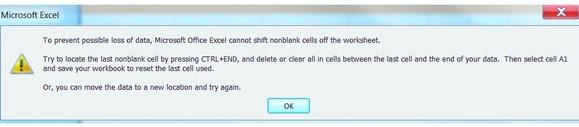
Microsoft Excel
To prevent possible data loss, Microsoft Office Excel cannot shift nonblank cells off the worksheet
Try to locate the last nonblank cell by pressing CTRL + END, and delete or clear all in the last cells between the last call and end of your data. Then select cell A1 and save your workbook to resel the last cell used.
Or you can move the data to a new location and try again.
Ok
Limit of the amount of rows and columns in a worksheet.
Dear Maria Trienity
First of all, please tell me which version of MS Excel are you using right now on your computer? Usually in Excel 2003 there are 256 columns and 65,536 rows. This is the maximum limit for Excel 2003 and you can’t exceed or add any more rows or columns. But there is a way to solve this problem. Just upgrade your Ms Excel 2003 to 2010. It ismore comfortable and user friendly. In Ms Excel2010 you can use 10, 48,576 rows and 16,384 columns. It’s huge. I think this will help you. Enjoy.
Thank you
Limit of the amount of rows and columns in a worksheet.
At first you have to hide idle rows and columns. Select first column to the right of preferred area to show. Click SHIFT + END + Right Arrow to select all columns. Go to Format menu and click on Hide. Select first row to the right of preferred area to show. Click SHIFT + END + Right Arrow to select all rows. Go to Format menu and click on Hide. Right click on the Excel logo left of “File” on the menu bar then click on “View Code” and then write your range like “A1:N40” as you need. ALT+Q to go back to Excel then go to Tools click on Options, click on Security, click on Macro Security to “Medium” then Save and close the workbook. Now you can get rid from that problem.