My question is that I have DSL Internet connection but the problem which I am facing is that, when I try to start browsing on the Internet, after some time the computer gives the error that your IP is conflicting.
What will I have to do? Please give me the solution, so that I can access the Internet for a long time.

- Login or Signup Now to post comments

How to solve IP Conflicts
IP conflict takes place when two computers/laptops on the same LAN network end up with the same IP address. In this case, both computers/laptops result to not being able to connect to network resources or execute other network operations.
The problem may arise due to the following factors:
In order to solve the problem, the following can be applied.
If you still have queries regarding the IP address conflict, leave your thoughts here and I’ll try to assist you!
Have a good day!
Hi Jakymaky45,
An IP Address Conflict happens when two computers or any network device on a local network has been assigned the same IP address. If you are using a router, it's not likely to happen because routers assign unique IP addresses except if the computer has a static or manual IP address.
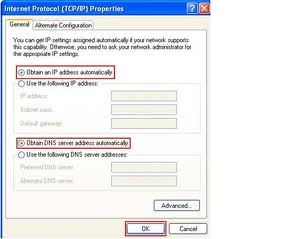
I can give you some steps. You can try and that may fix the IP Address Conflict. Check if the computer is set to Automatic IP or Manual. Follow the steps below:
1. Open the Network Connections window and right click LAN or Wireless Connection [ whichever you are using]. Select Properties and double click on Internet Protocol TCP/IP. Make sure it is set on Automatic.
2. You can try to repair the connection. On the connection window, you can right click it and select repair [this is applicable to windows XP only]. For windows Vista and 7 you can try to diagnose the problem and send me the reply, so I can give you a way to fix whatever the diagnostic result is.
3. You can turn off/ on your network. Power them up in a proper order [ modem-router-computer and other devices].
Reply for suggestions and feedbacks.
Hazzz0000
All computers should be synchronized and should use the same configuration to connect to the network. Since you have a multiple computer connected, then most likely you have a networking devices such as router, switch, hub or a gateway type of DSL modem/router.
You'll need to know what type of Internet protocol you are subscribed to. Contact your ISP and ask if your at Static, Dynamic or PPPOE.
Whenever you identify this type of protocol, then you will have the idea what to do in the next steps. Let's say, you use DHCP/Dynamic IP Address.
Modem should be on Bridge mode and router should be set to DHCP/Dynamic IP Address for proper modem/router communications.
Computer should be on Auto-obtain IP Address and DNS.
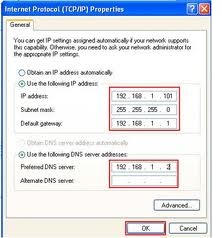
If you are using a switch type of networking, then you need to manually assign an IP Address different from the other computers. You should set a unique IP address, instead of Auto-Obtain IP Address, assigned an IP address, Default gateway, Subnet Mask and DNS.
Regards
Sharath Reddy
Hello,
Don’t overlap the IP address ranges and then the DHCP server that are using the dynamic or maybe the allocation of the IP address.
You can do this by simply comparing all of the server IP address ranges and then you must use the static allocation to review each code of the IP address, as it is easier to enter the administration and then make sure to check the LAN segment if there is a duplicate IP address. After that, you must reconfigure the machine to use a DHCP so it can be assigned as a new address and you must configure the DHCP server to stop the assigning to the duplicate IP address to have an address not to be to changed.