Asked By
Sherry Bass
5 points
N/A
Posted on - 01/03/2012

I have a Dell XPS M1530 laptop. Recently, I’ve changed the settings of my Windows Vista in order to Windows 7. At the beginning everything was perfect, my USB mouse worked properly for the days. But the entire USB ports stopped working as soon as I input a memory stick. These nevertheless produce energy; however the Windows does not identify any kind of USB device in any way right now. Do you have some answer for this?
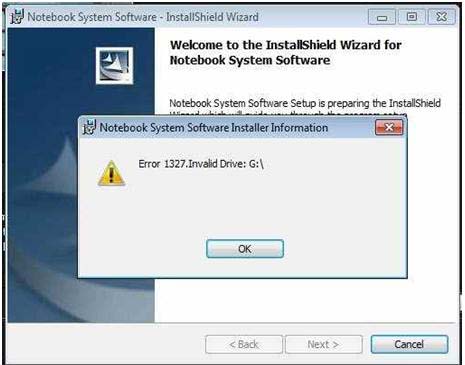
Error message from Notebook System Software Installer Information
"Error 1327. Invalid Drive: G:"
Error 1327: USB cannot be detected
To resolve that issue, I will suggest that you try the following workaround.
-
On your computer, you will need to click the Start button.
-
And then you will need to type CMD in the search.
-
Locate the command prompt from the programs and right click on it.
-
And then you will left Click Run as Administrator.
-
In the Command Prompt you will need to type the following: subst G: C:
-
After that you will need to hit the Enter keyboard on your keyboard.
After that try plugging in the mouse and see if it will be detected.
-Thompson Locker
Error 1327: USB cannot be detected
Hello Sherry
I would like to tell you to uninstall the current drivers which you have in the system entirely.After doing so you have to restart the system and reinstall the drivers again which you got with the laptop.After reinstalling the drivers you may have to restart the system again if it asks for the restart.After this you will be able to use the USB as you did earlier.But if this does not help then you should install the windows again.But this is the last option you can perform the other options before coming to this one so please ensure that you have tried all the other options which i have told you before switching to this option which is your last option.This final step would definitely help you.
thank you
Gaurav3282