

Hello,
I am confronted with a weird kind of a problem with my EeePC. The following error message seems to pop-up without any specific
action that could provoke this kind of behavior:
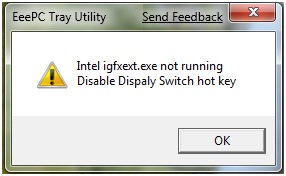
EeePC Tray Utility Send Feedback
Intel igfxext.exe not running
Disable Display Switch hot key
I have a free version of Avast antivirus software WHICH isn't very reliable but I still consider problems other than viruses. If anyone had the same problem please notify me, I would be grateful for any kind of support.

- Login or Signup Now to post comments

Your video driver could have a problem with the installed one in your computer. It might be corrupted due to unexpected shut down or it could be virus related.
Solution 1:
You can just reinstall the driver of your computer by running the CD which comes with the computer that says it is the Driver or you can download the video driver in the internet. Install the necessary driver for the video and then see if the problem still does exist.
Solution 2:
Scan for viruses in your computer or if you don't have any anti virus software, purchase and install one first before you can scan your whole unit. If you want a free one download Microsoft Security Essentials and then install it. You need to have a genuine copy of your operating system though.
The file the system is telling about is the Display Switch utility which is bundled in your EeePC installation desk. With this file you are able to switch your display, from your EeePC to extended Display like Projectors. By pressing function plus the key, mostly Function+F2 you will be switch to the extended monitor or vice versa.
You can uninstall this utility. Look for the installation on the “Add and Remove Programs” of your operating system. After removing, you can re-install the utility that comes in your bundled CD and I am sure that the message won’t show up again.
Actually, this utility is not necessary to have in your EeePC. Operating systems or even video drivers has these features. You can switch your display even if without the said utility.









