No of visitors who read this post:
2459
Category:
MultiMedia Applications
Type:
Question
Author:
Joy22
Hi Experts, I have this software Adobe audition where I am trying to mix some audio files in it. Unfortunately, as I saved my project, there is an error that shows up. I tried to reinstall it but it didn’t give me luck. i need your help.
Adobe Audition
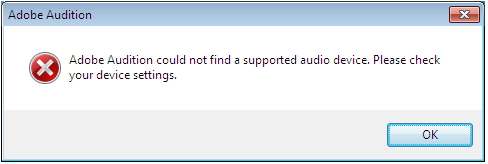
Adobe Audition could not find a supported audio device. Please check your device settings.

- Login or Signup Now to post comments

HELLO,
This problem can be identified in different types.
Either your Operating System is not compatible with your installer
The installer is corrupt
Your place TIME ZONE is not on its exact date and time.
Or you need another system or software of the audio in order to run the installer. Please choose on which audio device you want to install.
Be sure to download that is compatible to your WINDOWS and the motherboard bit system.
http://filehippo.com/download_realtek_high_definition_audio_vista/
I recommend to used REALTEK High Definition AUDIO if your motherboard support a realtek software.
Just follow the steps to download and install it properly.
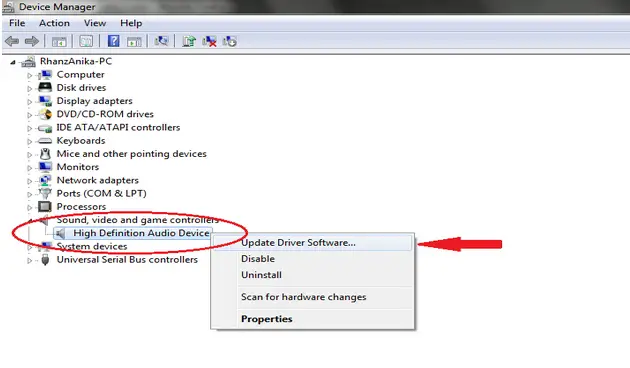
Another way also is to update your AUDIO Device software located in DEVICE MANAGER. This can be located in CONTROL PANEL+SYSTEM SECURITY+SYSTEM
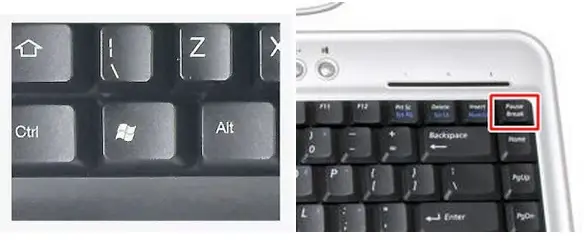
You can also shortcut this by HOLD and PRESS window key in your keyboard and press PAUSE/BREAK.
A window of the CONTROL PANEL will show.
SELECT the DEVICE MANAGER.
And Update your AUDIO DEVICE as shown below.
I hope this will help.
Hi,
Adobe Audition is limited to certain file formats when it comes to its audio capacity. I recommend you to choose your driver first before doing your projects.
Remember, when you install Audition, it includes the sound driver for Windows. You just have to choose the supported driver of your system.
Just open Audition> Edit> Hardware Setup
Every tab you see there is a corresponding driver settings that you must configure individually according to what your system supports.
If your system is an ASIO (Audio Stream In/Out) or a Windows driver, you can configure its settings by opening your Control Panel.
You can get an ASIO4ALL but make sure you download it from a trusted site.