No of visitors who read this post: 660
Category: MS Groove
Type: Question
Author: Alice Macek
No votes yet

Hello all

I am using Microsoft SharePoint workspace previously known as Microsoft office groove for document collaboration with my team. I recently tried to download an item in SharePoint workspace but unfortunately I got an error. When I clicked the resolve error button nothing was resolved , instead the same error returned back again. The error reads as:

"SYNC_E_ITEM_HAS_CHANGE_UNITS"

The screenshot of the error is attached below:
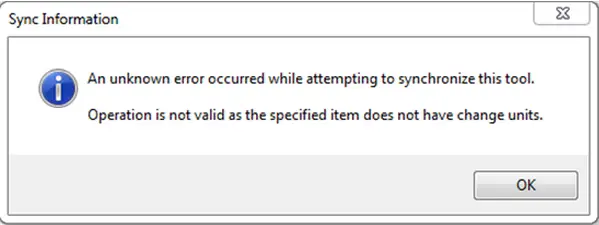
An unknown error occurred

Sync Information

An unknown error occurred while attempting to synchronize this tool.

Operation is not valid as the specified item does not have change units.

                                                                                     OK

I tried to solve the problem by disconnecting and then again connecting it to the server but still in vain. I searched a lot of forums for the solution but unfortunately found nothing useful.

Your help is needed to solve the issue.

Waiting for your suggestions

Regards

Peter

Comment viewing options

Select your preferred way to display the comments and click "Save settings" to activate your changes.

#

This error occurs if you have corrupted files.  So one thing that you need to do here and could be a time consuming is to find that corrupted file. Also in SharePoint there are a limited number of files that you can have. The memory is limited only to 2 Gigabytes (around 500 documents). You need to know the topic about “Synchronize SharePoint content with SharePoint Workspace”. You can find reference here http://office.microsoft.com/en-us/. So managing your Sharepoint specially your files will keep you away from this error. So all you need to do for now is to locate the corrupted file and then remove it.

Good luck.