


MS Visual Basic System Error &H80004005 (2147467259)

Hello community.
I finished to compile my program in November of 2009, after that I moved on to other attempts. I have made an attempt to make some code enhancements and my source code was unable to compile anymore. I have downloaded the latest flash10h.ocx. Any of my programs include FLASH (even the simple demo programs) is now compiled.
I look for a fix over the internet, and found a suggestion which advised me to rename the flash*.ocx to flash.ocx and re-run regsvr32.
But it didn’t work.
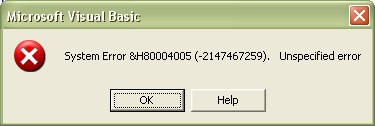
When I deleted the flash element there was no problem on saving and creates an executable. After that I add FLASH elements again, the problem emerged when I tried to save the file. Image below displays the error which I got…
How can I fix this?
I would like to mention my Environment:
Windows XP Professional Version 5.1.2600 SP3 Build 2600
VB6 (SP4) Version 8862
SWF created in FLASH 8 (and earlier)
Latest Flash OCX (flash10h.ocx
Error:
Microsoft Visual Basic
System Error &H80004005 (-2147467259). Unspecified error













