Submitted by Dorin Molis on Fri, 2012-02-17 15:56.
Comment Id: 47094
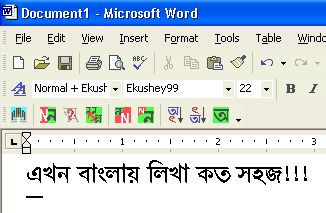
If you want to write Bangla language font in Microsoft Word like. You need to install Ekushey. It will install seven fonts in your system, which also includes one of each of the four popular (Bijoy, Bijoy99, Proshika and Lekhani) font groups in Bangladesh.
One from each of the two fonts supported by iLEAP. Indian Centre for Development of Advanced Computing (CDAC) released iLEAP for word processor; It also supports the Bengali and Assamese fonts. It can recognize 250 Bangla fonts automatically, and you can easily upgrade it.
If you are a new user and don’t know how to use this software. I recommend you to use the UNICODE keyboard layout. But you can choose popular keyboard (e.g. TopType, National, Munir, etc.) during the installation process. You can easily set up software to support any keyboard layout, and by using the keyboard editor you can create a custom keyboard for your own.
Submitted by Laureano_manuel_ on Fri, 2012-02-17 18:07.
Comment Id: 47107
I would suggest to check your MS- Word Application. Then, browse the bangla font .If its unavailable. Import the Bangla font by downloading a good converter. Try and download these converter.
Submitted by Mayin on Sat, 2012-02-18 03:31.
Comment Id: 47164
There are lots of keyboard layout softwares (like Bijoy) to type Bangla in MS Word. But you have to know the exact keyboard layout to type Bangla by using this Layout software.
Submitted by Monzurul Islam on Mon, 2012-02-20 10:49.
Comment Id: 47309
In Microsoft word you have the facility to write in Bengali font. Microsoft word gives options to its user to choosing their mother tongue freely without even installing any software. You can write Bengali in word, you just have to follow the given instructions :
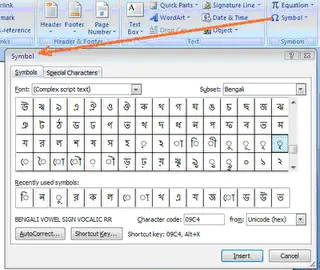
First of all Just click on ‘Insert’ button on the menu.
Then select ‘Symbol ‘option at the right corner.
Now a dialog box will appear. In that window choose ‘(Complex script text)’ from ‘Font’.
And in ‘Subset’ choose ‘Bengali:
‘.
Bengali letters will appear on your screen. You can use as many letters as you want to write the required Bengali language.
By using the Shortcut keys you can speed up your inserting process. Here is an example for your better understanding, if you want to write the Bengali letter “ স (sha) ”, then type the shortcut number (09b8) associated with this letter, after that press “alt+x” at the same time.
If you want to write Bangla language font in Microsoft Word like. You need to install Ekushey. It will install seven fonts in your system, which also includes one of each of the four popular (Bijoy, Bijoy99, Proshika and Lekhani) font groups in Bangladesh.
One from each of the two fonts supported by iLEAP. Indian Centre for Development of Advanced Computing (CDAC) released iLEAP for word processor; It also supports the Bengali and Assamese fonts. It can recognize 250 Bangla fonts automatically, and you can easily upgrade it.
If you are a new user and don’t know how to use this software. I recommend you to use the UNICODE keyboard layout. But you can choose popular keyboard (e.g. TopType, National, Munir, etc.) during the installation process. You can easily set up software to support any keyboard layout, and by using the keyboard editor you can create a custom keyboard for your own.
I would suggest to check your MS- Word Application. Then, browse the bangla font .If its unavailable. Import the Bangla font by downloading a good converter. Try and download these converter.
Hope these will answer your question.
There are lots of keyboard layout softwares (like Bijoy) to type Bangla in MS Word. But you have to know the exact keyboard layout to type Bangla by using this Layout software.
The most easy way so far to type bangla is using Avro Keyboard. Here is an unique feature. You can type Bangla by using your mouse. Click on the onscreen keyboard layout and it will be typed in word page. You can download Avro keyboard from here: http://www.omicronlab.com/avro-keyboard-download.html.
Thanks.
In Microsoft word you have the facility to write in Bengali font. Microsoft word gives options to its user to choosing their mother tongue freely without even installing any software. You can write Bengali in word, you just have to follow the given instructions :
First of all Just click on ‘Insert’ button on the menu.
‘.
Bengali letters will appear on your screen. You can use as many letters as you want to write the required Bengali language.
By using the Shortcut keys you can speed up your inserting process. Here is an example for your better understanding, if you want to write the Bengali letter “ স (sha) ”, then type the shortcut number (09b8) associated with this letter, after that press “alt+x” at the same time.
Very easy.
Follow the given step:
1. Install Bangla softwire. (ex: Bijoy bangla classic)
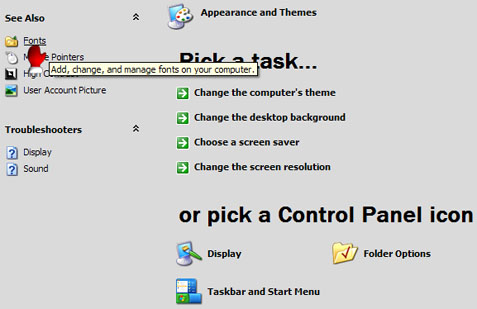
2. Paste Bangla font in Control panel>fonts.
3. Restart your computer.
Then you are able to type Bangla In MS Word.