Asked By
noel_dy
20 points
N/A
Posted on - 09/24/2012

Hi experts,
I cannot open any applications in my computer. All seemed to be invalid Win 32 applications. I thought it was just a virus so I tried scanning it with Norton, but it is also an invalid Win 32 application. I tried system restore but unfortunately it isn’t also a valid win 32 application. All I have is to reformat my pc. But before that I would like the help of all experts without giving me the solution I have. Is there any way to fix this without having to reformat my computer?
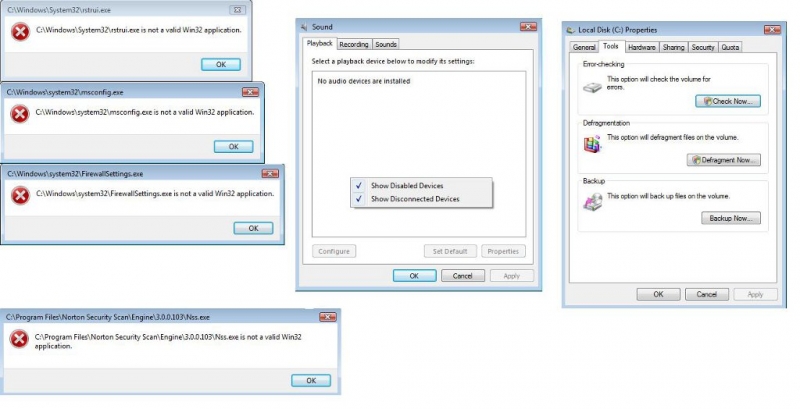
C:WindowsSystem32rstrui.exe is not a valid Win32 application
C:Windowssystem32msconfig.exe is not a valid Win32 application
C:Windowssystem32FirewallSettings.exe is not a valid Win32 application
C:Program FilesNorton Security ScanEngine3.0.0.103Nss.exe is not a valid Win32 application
All applications shows error message: invalid win32 application.
Hi Noel_dy,
There are many reasons that may cause an application to be invalid for windows 32. Reasons are like this:
There is a problem with your file i. e. those may be corrupted or renamed just adding extension .exe or one or more files have been missed. So please try to collect this program from pure source and before downloading clear off temporary files from internet explorer or use other browsers.
Files may not be created for your current windows version. So try trouble shooting option.
Your hardware may not support the programs.
All applications shows error message: invalid win32 application.
This might be due to a virus (possibly running in your PC). You will not be able to install and run any antivirus program before terminating this virus. To fix this problem without losing any of your data or without formatting your partition, follow the following steps:
-
Navigate to Control Panel and click on User Accounts.
-
Here click on create a new user link and create a new user with any name and password.
-
Now restart your PC and logon using new user account.
-
Install any anti-virus software and scan your PC completely.
Hopefully this will work because most of the anti-viruses have access only to that user on which they have been generated.
All applications shows error message: invalid win32 application.
Hi Noel_dy
Check out this Techyv post too to get more idea to resolve this problem.
Valid Win 32 application error
All applications shows error message: invalid win32 application.
If not a single program on your computer seems to work, not even your antivirus, it means your system is totally infected with a virus. When a computer or a system is completely infected, the performance of the machine goes down very poorly. Booting Windows takes forever and most of the software are not working.
If your antivirus is also not working, it means the infection crippled the security program. In this case, you need a virus removal tool to remove the virus. But the best solution here is to format the system drive, drive C, where Microsoft Windows is installed and install a fresh copy of the operating system.
You should only use a virus removal tool if you need to recover your files from the infected system. Download Sophos Virus Removal Tool. Once installed, start Sophos then wait for the virus signature database to get updated. When updating is complete, click to start scanning your computer. Sophos scans everything on your computer including devices connected via USB port.
When a virus is found at the end of the scan, remove it then repeat the scan over and over until it no longer detects a virus. Don’t disable your antivirus when using the tool. Sophos works alongside any antivirus program you may have. Note: this is not an antivirus so don’t use it as replacement for your antivirus. It is just a tool to remove hard-to-detect viruses.
It doesn’t have real-time protection like what antivirus programs provide. This tool will automatically stop working when it reaches the end of its usability period. If you want to continue using it, you have to download the program again.