I received this error code, Error number: 0x8024D007 when I tried to install windows updates. I don’t know why this happens. I didn’t get any thing from Microsoft support also. Can someone suggest anything to me? Thank you.
This problem occurs when the windows update agent file Wups2.dill is registered incorrectly in the registry. Because the registry files that correspond to the Wups2.dill file are missing, update installations are unsuccessful.
Error code “0x8024D007” returns “WU_E_SETUP_REGISTRATION_FAILED” which means the Windows Update Agent could not be updated because regsvr32.exe returned an error. If you receive this error when updating Windows, try scanning your computer for viruses. Update your antivirus and run a full system scan. You can also download Sophos Virus Removal Tool. Install it on your computer and scan your machine.
It works alongside any antivirus program you may have so don’t uninstall your antivirus. If the system turns out to be clean, try to disable your antivirus and then install the Windows Update. See if this works. If this doesn’t work, restart your computer in Clean Boot state. Click “Start,” “All Programs,” “Accessories” then right-click “Command Prompt” and select “Run as administrator.”
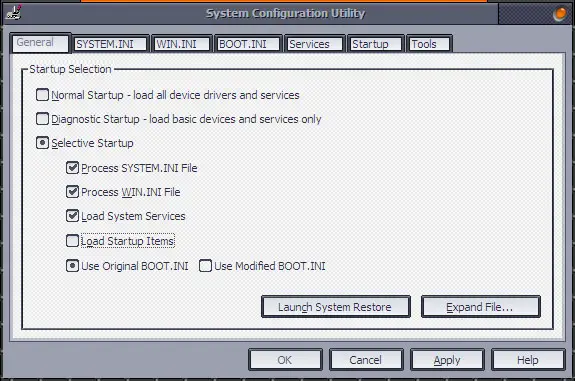
In the command prompt, type without quotes “msconfig” then hit Enter. In the “System Configuration Utility” window, in “General” tab, select “Selective Startup” then uncheck “Load Startup Items.” After this, select “Services” tab then click “Disable All.” Click “OK” then restart the computer.
Restart in Clean Boot state
After booting, make sure the native Windows Firewall is up. Click “Start,” “Control Panel,” “Security Center,” and then “Windows Firewall.” In Windows Firewall, make sure “On” is selected then click “OK.” Download MicrosoftEasyFix50202.msi and run it on your computer in Aggressive mode. When it is finished, restart your computer then try installing the Windows Update again. Once the update is successful, leave the Clean Boot state.
Run “msconfig” again and select “Normal” in “General” tab then restart the computer. This should boot the computer now in Normal mode.
If you want to rank top in search engine, you must analyze your SEO performance regularly. SEO reporting tools are crucial for establishing a substantial digital presence for your business. You can analyze your...
Audio enhancers are crucial for those involved in sound recordings. They help to clean up your audio recordings and ensure that the right sound reaches your ear without any background noise.
An AI audio enhancer...
When it comes to elevating the performance of your sales team, leveraging the right tools for sales enablement can make a substantial difference. As the sales landscape continuously evolves, staying ahead with efficient strategies...
The finest laptops are powerful enough to do your daily tasks, comfortable enough to use all day, and power-efficient enough to ensure you don't run out of battery power unexpectedly. Of course, all these...
Before getting into knowing the facts, let’s have a brief about the Dark Web. The dark web is the data of the World Wide Web that is accessible only through special software, combinations, or...
While looking for a chemical-free way to clear and purify both durable and low grounds in your home, a steam cleaner is an excellent solution. With a spurt of superheated steam, this cleaning equipment...
Internet monitoring software keeps a log of all internet activities. You can install this type of software on your computer remotely or by the administrator. An operating console controls this software. This type of...
A Hard Disk Drive is usually partitioned into various smaller drives for optimization. A partition manager helps make this process easier and more efficient. Here, let’s discuss the top 10 best partition manager software.
1....
Music production is the initial stage of any song. Music production can be done either in studios or at home using an online music production software. Here, let’s discuss the top 10 best online...