
I recently installed a fresh copy of Windows 7 on my Acer laptop. I was using Windows Vista before. But I am having problem with Windows Update after the installation. When attempting to upgrade my system, an error 8024402F is shown. Can anyone help me on this?
Windows Update Error 8024402F on Win 7
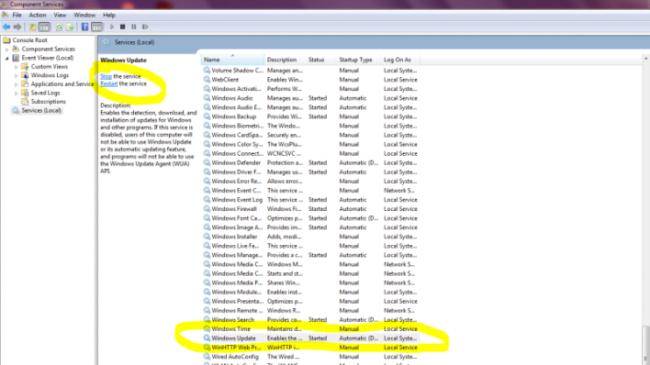
Open Control Panel then Administrative Tools, then open Services.
Scroll down to Windows listings as in Snips below.
Highlight Windows Update it should be set to Auto. If "Off" or disabled click Restart where I have it circled in yellow towards top left..
Then highlight Windows Module. Same thing click "Start" if off or disabled.
If either of these are disabled the updater will not work.
Answered By
pspipes
0 points
N/A
#123675
Windows Update Error 8024402F on Win 7
The error 8024402F when updating windows is usually caused by an interruption between your computer and the Windows Update servers.
First close Windows update, wait for about 10 to 15 minutes, and then run the Update again.
If the above solution doesn't fix the problem, try the Windows Update troubleshooter.
Visit the link.
In the File Download Dialog box, Click Run, and then follow the steps in the wizard.
After running the fix, open Windows update, and then try to install the update again.
If those solutions doesn't work, check your Internet connection, some programs on your computer prevents Windows Update from accessing the internet.
Programs that might cause this error are firewalls, antispyware, antivirus programs, or proxy servers.
















